
当日/次日达

品质保障

开启新人专享福利: 全场免邮 | 低至 2 折 | 免费试用 30 天 JoyPlus 会员
下载 Joybuy
The world of 3D printing is fascinating, yet the path to your first successful print can be paved with unexpected hurdles. Anyone looking to buy a 3D printer is often confronted with exaggerated marketing claims and technical specifications that obscure more than they clarify. Many devices advertised as user-friendly turn out to be time-consuming assembly kits, while others fail to deliver their promised performance in practice. As your Joybuy Product Recommendation Officer, I'll help you identify these pitfalls and make an informed decision that suits your projects and experience level.
Before we dive into the technical details, let's shed light on two common marketing traps that often lead to disappointment:
To avoid falling into these traps, you should carefully examine three core features. These determine whether a printer is suitable for your purposes—from simple hobby projects to sophisticated prototyping.
The mechanical structure is the foundation for speed and precision.
The extruder pushes the filament to the hot nozzle (hotend), where it is melted.
Especially for 3D printers for beginners, a straightforward setup is crucial.
Based on these criteria, we have compiled a selection of devices suitable for different requirements and budgets.
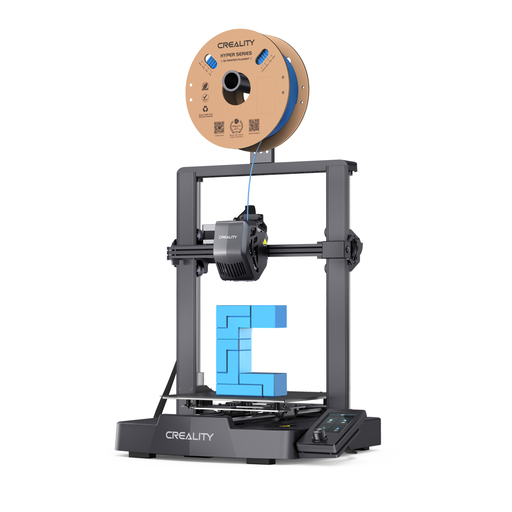
Why This Fits Their Persona: Ideal for anyone wanting to get into 3D printing with a solid and reliable machine without breaking the bank. It combines proven technology with modern convenience features.
It shatters the "plug-and-play" illusion with true CR-Touch auto-levelling and an automatic Z-offset sensor. This eliminates frustrating manual calibration and ensures a flawless first layer.
The proven "Sprite" Direct Drive Extruder reliably processes standard filaments like PLA and PETG. The quick assembly in about 20 minutes makes getting started straightforward.
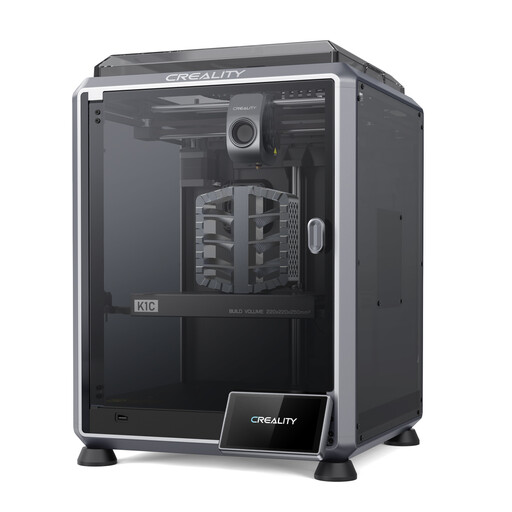
Why This Fits Their Persona: Perfect for users who want to create functional prototypes and components from engineering-grade materials. Speed, precision, and material flexibility are the main focus here.
It delivers on the promise of high speed and material versatility. The CoreXY structure enables a true 600 mm/s, while the enclosed build chamber and 300°C hotend allow for printing carbon fibre filaments (PLA-CF, PET-CF).
The integrated AI camera for monitoring and the clog-free extruder with a hardened nozzle make it a reliable workhorse for demanding print jobs. The quiet operating mode is an added bonus.
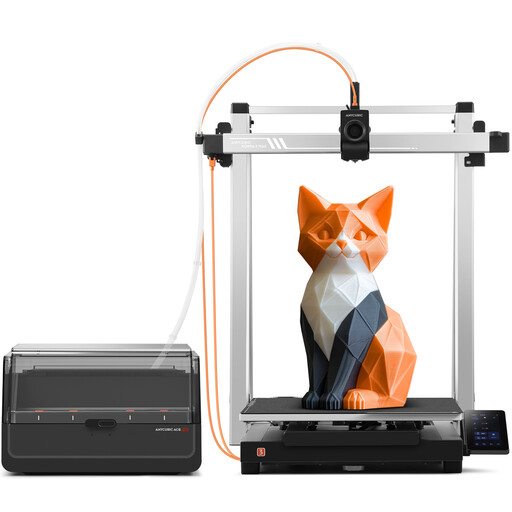
Why This Fits Their Persona: For creatives, designers, and small businesses who want to print large, complex, and colourful models in one piece. Ideal for small production runs or impressive one-offs.
This system is more than just a printer with an add-on. The ACE Pro system for 8-colour printing is seamlessly integrated and supplemented by a drying box that keeps filaments in optimal condition—an often overlooked but critical factor.
An exceptionally large build volume of 420 x 420 x 500 mm, combined with an advanced multi-colour system. The LeviQ 3.0 auto-levelling and AI-powered error detection ensure high reliability for long print jobs.
We have compiled a complete, up-to-date list of products that fully meet these strict selection criteria and local safety regulations.
FDM (Fused Deposition Modeling) printers, like the models presented above, melt plastic filament and apply it layer by layer. They are ideal for functional parts, prototypes, and larger objects. A Resin printer, such as the ANYCUBIC Photon Mono 4 10K, uses UV light to cure liquid resin. This technology allows for extremely high detail and smooth surfaces, making it perfect for miniatures, jewellery, or dental models.
For beginners, it is one of the most important features. A perfectly calibrated first layer is the foundation for any successful print. Manual levelling with a sheet of paper is time-consuming, inaccurate, and a common source of error. A reliable auto-levelling system does this work for you, reduces failed prints, and saves a significant amount of time and frustration.
That depends on the materials you plan to use. For standard filaments like PLA and PETG, an open printer is perfectly adequate. However, as soon as you want to work with high-temperature materials like ABS, ASA, or carbon fibre-reinforced filaments, an enclosed build chamber is essential. It ensures a stable, warm environment, prevents the model from cooling too quickly, and thus minimises warping and layer separation.