
Lieferung heute & morgen

Qualitätsgarantie

Willkommens-Angebote freischalten: KOSTENLOSE Lieferung | Bis zu 80 % RABATT | Kostenlose 30-Tage-JoyPlus-Testphase
App herunterladen
A gaming desk needs to offer more than an eye-catching surface and colourful lighting. For PC gamers, streamers, students and people working from home, the most important things are the right size, a sturdy construction and well-planned cable management. If you buy based on design alone, you may overlook practical limitations.
A desk with LED lighting can add a visual finishing touch to your setup. However, RGB lighting says nothing about stability, desk space or the quality of the desktop. Check whether the lighting connects separately, what controls it and whether the power supply and cables are included.
A 140 cm-wide gaming desk may offer less clear space than expected once you account for a monitor shelf, side shelves or a deep frame. If you’re using two monitors, a keyboard, mouse and work documents, compare the usable depth and the position of any shelves. An L-shaped gaming desk can save space in a small room, but it needs a suitable corner and enough room to move around.
A desk with mains sockets and USB ports can reduce cable runs, but it should not be overloaded. Check the connection types and maximum load stated in the product specifications. Do not use damaged sockets or ports. Keep electrical components away from liquids, too.
Measure the intended space, including clearance from the wall, room for your chair and the cable route. These measurements are particularly important for a PC desk:
A monitor shelf can free up desk space and raise the screen. However, it is no substitute for a seating position and screen height that suit you.
A carbon-fibre desk is often made not from real carbon fibre, but from engineered wood with a carbon-fibre finish. So pay close attention to the specifications for the desktop, frame, crossbars and maximum load. Metal or steel frames can provide a sturdy base, while crossbars also affect resistance to twisting.
Before you buy, check:
A desk with shelves is useful for books, controllers, printers or speakers. Adjustable shelves come in handy if you need to accommodate different devices. A PC tower stand needs to be wide and tall enough for your case.
For USB ports and mains sockets, the number and position matter. The Bestier L-shaped model has three mains sockets and two USB ports. The SEVEN-WARRIOR model has two AC sockets and two USB ports. These features can shorten cable runs, but make sure you use them in line with the manufacturer’s instructions.
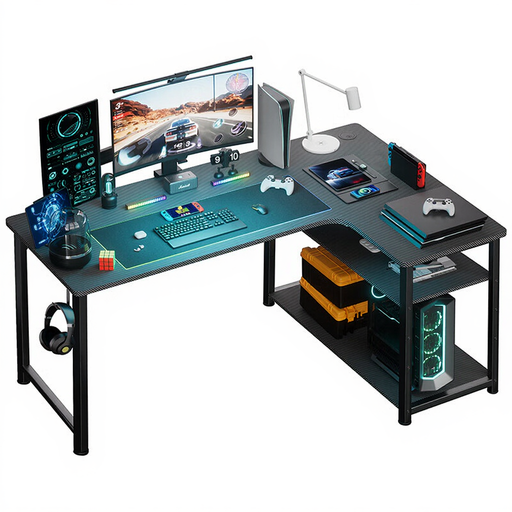
Why this product suits this user: The compact corner design combines a 120 cm work surface with storage, making it suitable for gaming, studying and a small home office.
The key features are clearly specified: two adjustable shelves, a power connection and two USB charging ports. Measure the corner space before buying.
L-shaped design, steel and engineered wood, adjustable shelves, and integrated USB and power connections.
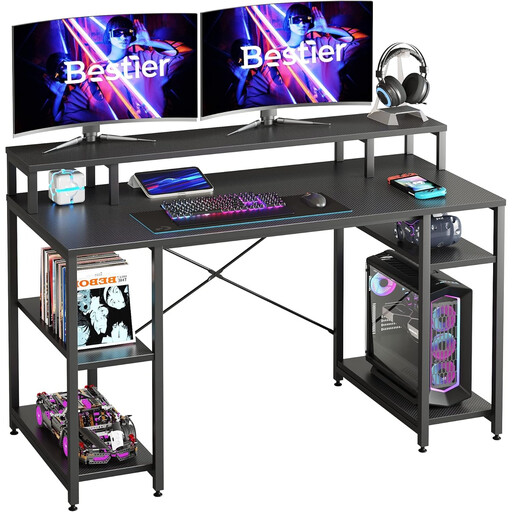
Why this product suits this user: Its rectangular design is ideal for anyone who prefers a clear work surface for computing, gaming or using several devices.
Its 140 cm surface, raised monitor shelf, metal frame and X-shaped crossbar are all specified as key design features.
140 × 60 cm, monitor shelf, adjustable shelves, metal frame and P2 engineered wood with a carbon-fibre finish.
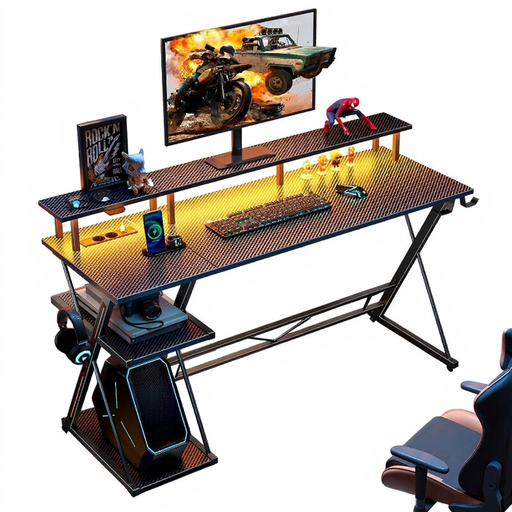
Why this product suits this user: Streamers and frequent users get a straight work surface with a monitor stand, PC tower stand, headphone hook and charging ports.
The power features are clearly specified: two AC sockets and two USB ports. The maximum height for the PC tower stand and assembly instructions are also provided.
140 cm desk, monitor stand, PC tower stand up to 47 cm, two AC sockets, two USB ports and app-controlled RGB lighting.
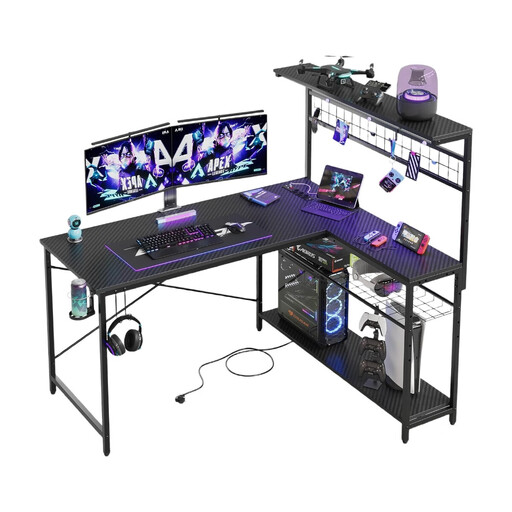
Why this product suits this user: This reversible corner desk makes use of vertical space and combines a work surface with four shelves, a monitor shelf, hooks and a cup holder.
The reversible layout can be adapted to suit your room. Its connections are clearly specified, with three mains sockets and two USB ports, but make sure you measure the corner precisely.
130 cm L-shaped design, steel frame, carbon-fibre finish, four shelves, RGB strip with seven colours and 22 modes, plus accessory hooks.
All the models listed require self-assembly. Sort the screws and components before putting the desk together, and initially tighten the connections by hand only. Once everything is aligned, tighten all the fixings securely. The desk must stand on a level surface.
For a desk used for both working from home and gaming, it helps to organise your space into clear zones:
Clean the surface in line with the manufacturer’s instructions. A soft, slightly damp cloth is often enough; harsh cleaning products can damage the finish and coating.
We’ve put together a complete, regularly updated list of products that fully meet these strict selection criteria and the safety regulations in force in the EU.
A 120 cm desk may be enough for a single monitor and a compact setup. If you have two monitors, speakers and extra work materials, 140 cm or an L-shaped model is more practical. The usable depth and space available for your chair are still key considerations.
Yes, as long as the work surface, desk height and storage suit your daily needs. A monitor shelf can raise your devices and free up desk space. For longer work sessions, check that your seat height, keyboard and mouse positions, and freedom of movement are right for you.
Its lifespan depends on the materials, load, assembly and care. A metal or steel frame with crossbars can make the desk more stable, but it does not guarantee a particular lifespan. Stay within the stated load capacity, check the screw connections from time to time and stop using any damaged electrical components.