
Lieferung heute & morgen

Qualitätsgarantie

Willkommens-Angebote freischalten: KOSTENLOSE Lieferung | Bis zu 80 % RABATT | Kostenlose 30-Tage-JoyPlus-Testphase
App herunterladen
A tablet with stylus can make handwritten notes, sketches, PDF annotations and navigation much more comfortable. However, styluses differ significantly in their technology. A cheap universal stylus won't automatically work with every app or touchscreen. Likewise, claims like "precise" or "no lag" alone don't tell you whether the pen will suit your tablet and intended use.
Before you buy, it's worth avoiding three common mistakes:
First, check your exact tablet model and the manufacturer's specifications. An active stylus for tablet may require pairing via Bluetooth, a specific app or a particular protocol. The Teclast T-Pen, for example, uses the USI 2.0 protocol and is designed for the Teclast ArtPad Pro. According to the product details, no manual pairing is needed; the stylus is activated by touch.
A universal stylus for iOS, iPad, Android and Microsoft devices, on the other hand, often works via capacitive input. The VoxorAI HL-U05 requires a capacitive screen. The product information lists support for iOS, iPad, Android and Microsoft devices, and refers to an app for setup. So before buying, you need to check whether your own device and the app you use are actually supported.
For sketches, digital painting and precise line work, a drawing stylus for tablet with pressure detection makes sense. The Teclast T-Pen and the TECLAST ArtPad Pro are specified with 4096 pressure levels. These allow graduated input, provided the app in question recognises the feature.
For note-taking, calculations and occasional highlighting, a simple touchscreen stylus is often sufficient. In that case, pay more attention to:
A very fine tip can reduce visibility of the writing area, while a tip that is too soft or wears down quickly can affect precision.
A tablet with a stylus that is already matched to it reduces the risk of incompatible features. The TECLAST ArtPad Pro is offered with T-Pen support and an included stylus. According to the product description, the device features a 12.7-inch 2K display, Android 15, 256 GB of storage and a 10,000 mAh battery. On paper, this makes it suitable for users who want to buy a tablet and drawing stylus together.
If you already own an iPad, Android tablet or a Windows-compatible computer, you can instead choose a separate tablet stylus. This is particularly useful if you only need a replacement stylus or aren't planning to buy a new tablet. In this case, check the model list, the protocol and the return policy especially carefully.
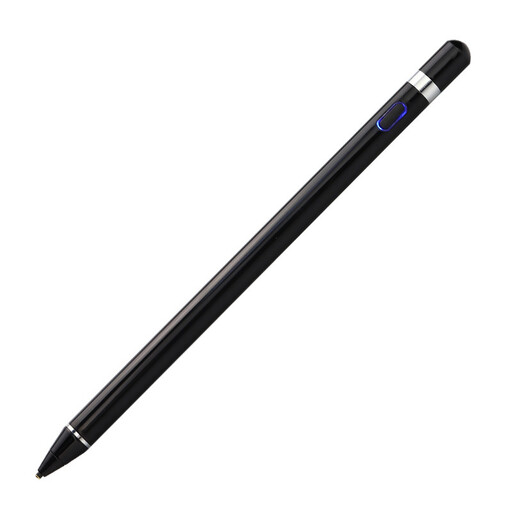
Why this product fits the profile: This universal stylus is of interest to users who want to write, draw and navigate on capacitive iOS, iPad, Android or Microsoft devices without buying a new tablet.
The product details explicitly mention capacitive screens and multiple operating systems. However, you should still check your specific device before buying.
140 mAh battery, 59.4 g weight and support for writing, drawing and precise navigation according to the product description.

Why this product fits the profile: If you want to buy a tablet and stylus as a matched system, you get a device with a large 2K display, T-Pen support and clearly stated technical specifications.
The product description explicitly mentions the tablet-stylus combination and 4096 pressure levels. This reduces the risk of choosing an incompatible universal model.
12.7-inch 2K display, 256 GB storage, Android 15 and 10,000 mAh battery according to the product details.
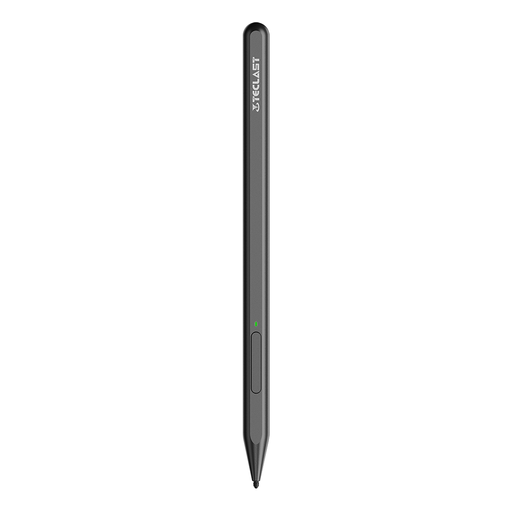
Why this product fits the profile: This stylus is aimed at users of the Teclast ArtPad Pro who want to make targeted use of pressure sensitivity when drawing or writing.
The clearly stated USI 2.0 protocol defines the scope of use. This avoids giving the impression that the stylus is compatible with every iPad or Android device.
4096 pressure levels, USB-C charging port and, according to the product details, no manual pairing or setup required.
We've put together a complete, regularly updated list of products that fully meet these strict selection criteria and the safety regulations in force in the EU.
No. A capacitive stylus does generally require a compatible touchscreen, but additional features are not guaranteed. Active models may require a specific protocol, an app or Bluetooth. So always check your exact tablet model.
The battery life depends on the capacity, usage and charge level. The VoxorAI HL-U05 is specified with an integrated 140 mAh lithium battery. The Teclast T-Pen is charged via USB-C. For actual battery life figures, you should check the respective product information directly.
That depends on the display, stylus and app. For digital drawings, pressure sensitivity, a precise tip and as little input lag as possible are important. A tablet for drawing should also offer enough storage and a display that suits your desired workspace. With the TECLAST ArtPad Pro and T-Pen combination, 4096 pressure levels are stated; the actual implementation may also depend on the drawing app you use.