
Lieferung heute & morgen

Qualitätsgarantie

Willkommens-Angebote freischalten: KOSTENLOSE Lieferung | Bis zu 80 % RABATT | Kostenlose 30-Tage-JoyPlus-Testphase
App herunterladen
A single wall outlet for your laptop, smartphone, tablet, and lamp—it's a common challenge in many homes, offices, and hotel rooms. A socket adapter with USB promises a simple, cable-free solution. However, the market is flooded with products whose performance claims often don't hold up to reality. Before you make a decision, it's crucial to understand the most common pitfalls and key technical features to make a safe and functional choice.
This guide, created by the Joybuy Product Recommendation Officer, will help you separate marketing hype from facts and find a product that truly meets your needs.
Many buyers are disappointed shortly after their purchase because their new adapter fails to meet expectations. These issues can often be traced back to three common but avoidable flaws.
To avoid the problems mentioned above, you should check three core technical aspects. These determine whether an adapter will be useful and safe for you.
Modern devices require specific charging technologies. Look for these two standards:
Always check the power rating per port, not just the adapter's total output. A good adapter will list the maximum wattage for each individual port.
Consider how many and what type of devices you want to connect at the same time. A simple dual plug with USB might be sufficient for a nightstand. For a desk, a wall tap power strip with multiple AC outlets and USB ports may be the better choice. The design as a cable-free power strip is particularly compact and ideal for travel or for avoiding cable clutter. Make sure the ports are spaced far enough apart.
Safety is non-negotiable. A reliable adapter should have the following features:
Instead of making a one-size-fits-all recommendation, we have identified products tailored to specific use cases.
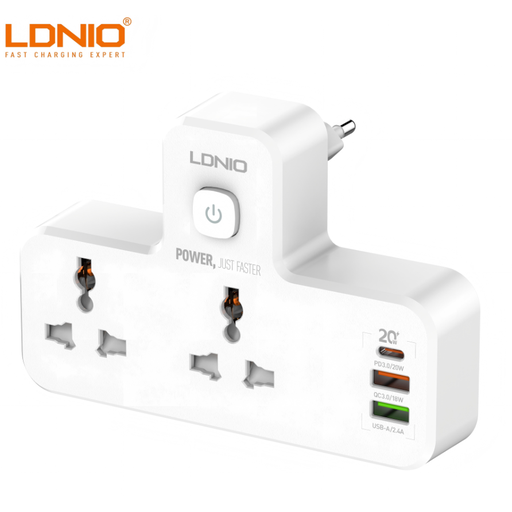
Why This Fits Their Persona: Ideal for people who need a compact, all-in-one solution for hotels, trains, or mobile work. This adapter combines AC outlets and fast USB ports without an extra cable, so it fits easily into any carry-on. It functions as a multifunctional travel adapter with USB for the EU region.
The charging power is clearly specified (20W PD, 18W QC), so there are no false expectations. The integrated Smart IC protection against overload and short circuits directly addresses safety concerns.
Combines 2 AC outlets, 3 USB ports (PD & QC), and a dimmable night light in a single, direct plug-in device. Extremely space-saving and functional.
Why This Fits Their Persona: Perfect for the bedroom or hallway. This socket adapter with a night light eliminates cable clutter behind the nightstand while providing gentle, touch-dimmable illumination. It powers a lamp, smartphone, and smartwatch from a single outlet.
Its vertical design ensures that adjacent outlets usually remain unobstructed. The integrated child safety lock provides the necessary security for use in living areas.
The combination of a wall charger with an AC outlet and a continuously dimmable night light is unique and creates a tidy, functional environment.
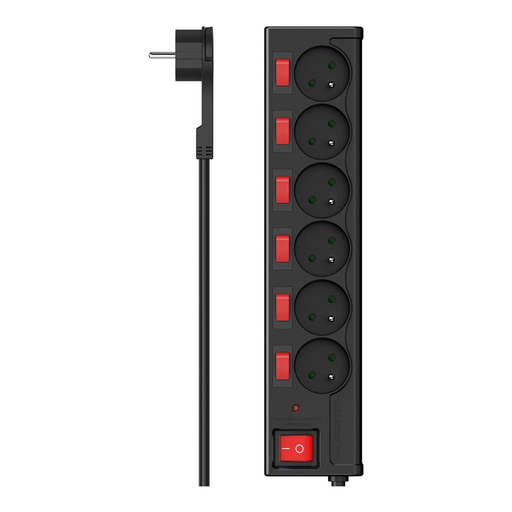
Why This Fits Their Persona: For users who need to power multiple devices like a PC, monitors, and printers and want full control. The flexibility of a cable and the ability to switch each device individually are crucial here.
This model bypasses the safety issue with explicit, integrated surge protection that safeguards valuable electronics. The individual switches also help reduce standby power consumption.
Offers 6 individually switchable sockets and a master switch for maximum control and safety. The 45°-rotated outlets make it easier to plug in angled connectors.
We have compiled a complete, up-to-date list of products that fully meet these strict selection criteria and German safety regulations.
USB Power Delivery (PD) is a universal charging standard that works via the USB-C port and can deliver higher power (up to 240W in the latest specification) to a wide range of devices, including laptops. Quick Charge (QC) is a proprietary technology from Qualcomm, found mainly in Android smartphones. Many newer devices support both standards. For maximum compatibility, an adapter with both technologies is advantageous.
That depends on two factors: the required charging power of your laptop and the power output of the USB-C PD port on the adapter. Most modern ultrabooks require between 30W and 65W. An adapter whose USB-C PD port only supplies 20W might be able to charge the laptop slowly when it's turned off, but not during operation. Check the specifications of your laptop's power supply and choose an adapter with at least an equal or higher wattage on its PD port.
Look for the CE mark on the product or its packaging. This is a basic requirement for sale in the EU. Additionally, look for explicit mentions of safety features like overload protection, surge protection, and integrated safety shutters (child-proofing). Products from established brands that transparently list these features generally offer higher safety.