
Lieferung heute & morgen

Qualitätsgarantie

Willkommens-Angebote freischalten: KOSTENLOSE Lieferung | Bis zu 80 % RABATT | Kostenlose 30-Tage-JoyPlus-Testphase
App herunterladen
A 100W USB-C charger can power your laptop, smartphone, tablet and headphones from a single power adapter. In practice, however, the "100 W" rating often leads to unrealistic expectations. What really matters isn't just the maximum wattage, but also how power is distributed across multiple ports, the charging protocol used, and the quality of the cable.
On a multi-port charger, the rating usually refers to the maximum total power output. As soon as you connect several devices, the power gets shared. For example, a power adapter might split power 70 W and 30 W between two USB-C devices. With three devices connected, the distribution can change again.
So before you buy, check:
A laptop that needs 65 W to charge can be well served by a 100W fast charger. If you're charging a smartphone and headphones at the same time, make sure the port distribution still suits your needs.
A GaN 100W charger uses gallium nitride instead of traditional semiconductor materials. This allows for compact designs and efficient power conversion. However, GaN alone tells you nothing about which ports, charging protocols or safety circuits are included.
Look for specific features such as PD 3.0, PPS, Quick Charge, overcurrent protection, overvoltage protection and temperature monitoring. A foldable mains plug can also be handy for a USB-C travel charger, as it reduces the overall size when packed.
For high charging power, the cable must support the required current and power. An older USB-C cable can limit charging speed, even if the charger itself delivers 100 W. For laptops, we recommend a cable specifically designed for high USB-PD power. The Anker model includes a USB-C cable in the box.
A USB-C laptop charger should offer not only maximum power but also a suitable voltage profile. USB Power Delivery automatically negotiates the required power between the charger and the device. The adapter doesn't deliver 100 W constantly; instead, it adjusts the output to match the connected device.
Here's a rough guide:
You'll find the actual power your device needs in the manufacturer's specifications. A more powerful charger won't necessarily charge faster if the device or cable doesn't support that power level.
A USB-C charger with multiple ports is especially useful if you regularly charge several devices. USB-C is ideal for modern smartphones, tablets and laptops. USB-A remains practical for older cables, accessories and certain headphones.
A multi-port charger with three or four ports can declutter your desk and travel bag. But do check whether the USB-A ports deliver significantly less power than the USB-C ports when used simultaneously.
Technical safety features should at least cover overheating, overload and short circuits. They won't prevent every possible misuse, but they do reduce risks during normal use. Don't cover the charger during heavy use, and make sure it has adequate ventilation.
For travel, 100–240 V input voltage, a foldable plug and a robust casing are also important criteria. For journeys in the car, you'll need a 12 V or 24 V compatible car charger instead of a standard mains adapter.
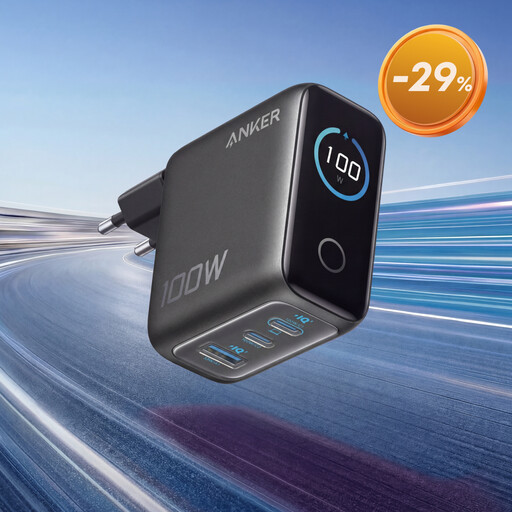
Why this product fits the profile: Three ports, a USB-C cable included, and a display showing power, voltage and temperature – ideal for users who want clear visibility of the charging process.
The display makes it clear that power is shared when multiple devices are connected. The foldable plug also reduces the packed size.
100 W total power, three ports, GaN technology, USB-PD support and documented temperature monitoring according to the product description.
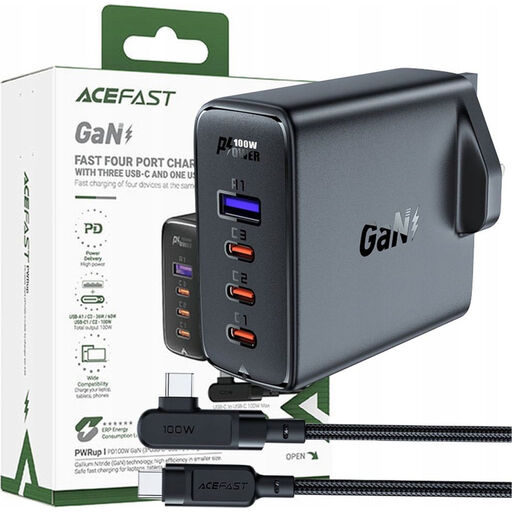
Why this product fits the profile: Four ports and 100 W total power provide a functional foundation for users with several USB-C devices. Note that the UK plug variant is specified – you may need an adapter for continental European sockets.
The number of ports and safety features are clearly stated. However, you should check whether a suitable adapter is needed for your sockets.
3 USB-C ports, 1 USB-A port, GaN technology, plus overheat, overload and short-circuit protection according to the product specifications.
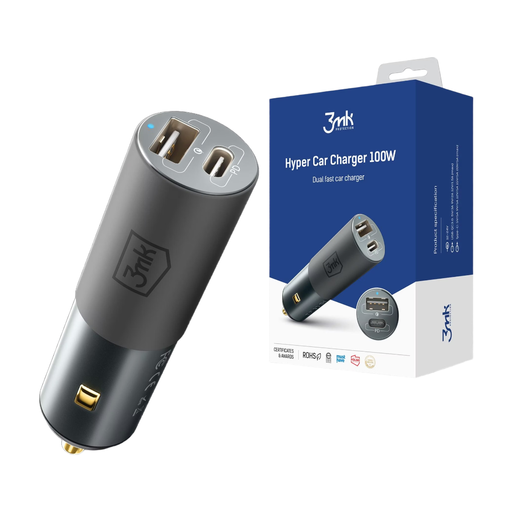
Why this product fits the profile: This car charger is designed for commuters and frequent travellers who need to power devices from a 12 V or 24 V vehicle socket.
The power source is clearly identified as a vehicle socket. This prevents it from being accidentally bought as a stationary USB-C mains adapter.
USB-C and USB-A, 100 W total power, simultaneous charging of two devices, and integrated overvoltage protection according to the description.
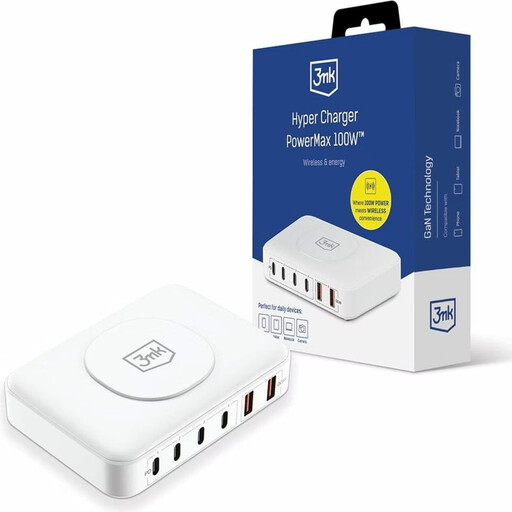
Why this product fits the profile: This charging station offers four USB-C and two USB-A ports plus wireless charging, making it ideal for a fixed workstation with multiple devices.
The large number of ports is clearly stated. However, buyers should note that the 100 W is shared across all functions and connected devices.
Six ports, support for Power Delivery and Quick Charge, plus integrated wireless charging according to the product description.
We've put together a complete, regularly updated list of products that fully meet these strict selection criteria and the safety regulations in force in the EU.
Use cables with the appropriate power rating and avoid damaged connectors. Don't cover the power adapter while it's in use, and don't place it in damp areas. If the casing becomes cracked, a port becomes loose, or you notice an unusual smell or smoke, stop using the device immediately.
When using a fast charger for MacBook and iPhone, remember that each device only draws the power it supports. A higher maximum power rating doesn't automatically mean higher electricity costs. Energy consumption depends mainly on the charge level, charging frequency, efficiency and standby behaviour.
No. The devices must be electrically and protocol-compatible. USB-C only describes the connector type. For fast charging, you also need standards like USB Power Delivery or PPS. Small devices such as headphones or smartwatches normally regulate their own power intake, provided the charger is correctly designed.
That depends on the port distribution. A 100W Power Delivery charger might, for example, supply a laptop with 70 W and a smartphone with a smaller share. Check the specifications for dual or triple port use, because the power isn't 100 W on every port simultaneously when charging in parallel.
Not necessarily. The wattage indicates the maximum possible output power, not the permanent consumption. If a smartphone only requests a small amount of power, correspondingly less energy is transferred. For efficient operation, use compatible charging protocols, a suitable cable, and disconnect devices you're not charging.