
Lieferung heute & morgen

Qualitätsgarantie

Willkommens-Angebote freischalten: KOSTENLOSE Lieferung | Bis zu 80 % RABATT | Kostenlose 30-Tage-JoyPlus-Testphase
App herunterladen
A 5K digital camera for beginners may seem appealing at first glance thanks to its high resolution figures, zoom levels and numerous additional features. In practice, however, 80 MP, 64 MP or 48 MP alone do not determine whether a camera is suitable for everyday use. For parents, teenagers, travellers and aspiring vloggers, ease of use, actual image quality and safe handling are often more important.
Figures such as “80 MP” or “64 MP” may refer to interpolated image resolutions. In this process, the file is enlarged digitally without the image sensor capturing a corresponding amount of additional image information. When comparing cameras, you should therefore check whether the manufacturer distinguishes between native sensor resolution and interpolated maximum resolution.
A 48 MP digital camera may be perfectly adequate for snapshots, school projects or social media. It is also important to consider whether the autofocus works reliably, whether the lens captures enough light and whether the camera produces too many blurred images when subjects are moving.
An 18x zoom sounds impressive. With an affordable digital camera, however, this does not necessarily mean optical zoom. Optical zoom changes the focal length using the lenses while retaining more detail. Digital zoom enlarges the image area digitally, which can make the image look noticeably softer.
A camera with 8x optical zoom, or a travel camera with 10x optical zoom, should therefore be assessed differently from a model that relies solely on digital zoom. Always check the product description for the exact wording.
Wi-Fi, dual cameras, night vision and a touchscreen can all be useful. However, they also increase the number of settings that beginners must first understand. For children and teenagers, you should consider large controls, a clear menu and an easy-to-read display.
Also pay attention to safety warnings: these cameras are not toys. Lithium-ion batteries, memory cards and small accessories should be kept away from young children. The devices should be protected from water, excessive heat, drops and direct sunlight.
A 5K camera is often advertised with a video resolution of 5120 × 2880 pixels. The frame rate is equally important: 30 fps is suitable for many everyday scenes, while some models use 25 fps. For recording movement, you should also look for electronic image stabilisation.
A camera with image stabilisation can compensate for small hand movements when recording videos. However, electronic stabilisation is not the same as mechanical stabilisation and may result in a slightly cropped image, depending on the recording.
An autofocus camera makes it easier for beginners to photograph people, pets and holiday scenes. On a model with front and rear cameras, the additional lens may be useful for self-portraits or simple vlogs. A focusing aid in low light helps the camera focus, but it cannot replace sufficient lighting.
A camera with night vision or full-colour night vision should be assessed based on how it actually works. The name alone does not indicate how bright, detailed or colour-accurate the images will be.
Before buying, check whether a compatible memory card is required and whether one is included. 5K videos take up considerably more storage space than lower-resolution clips. An additional battery can be useful when travelling or during longer filming days.
For vlogging, an external microphone connection, a tripod mount and simple Wi-Fi image transfer are also relevant. With the models mentioned, Wi-Fi is primarily used to transfer images wirelessly; it does not automatically mean that direct cloud backup or a livestreaming system is available.
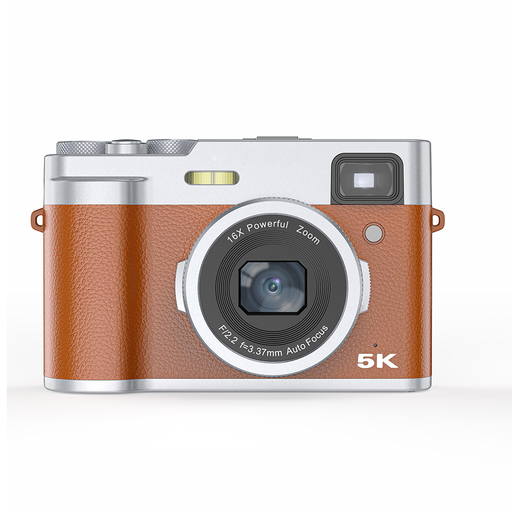
Why this product suits this profile: Its compact design, 2.8-inch IPS display and front and rear cameras make it suitable for schoolchildren, teenagers and beginners with a limited budget.
The product specifications explicitly identify the 48 MP resolution as interpolated. This makes it easier to assess the resolution figure realistically.
5K video at 30 fps, autofocus on the front camera, Wi-Fi image transfer and electronic stabilisation with a 6-axis gyroscope.
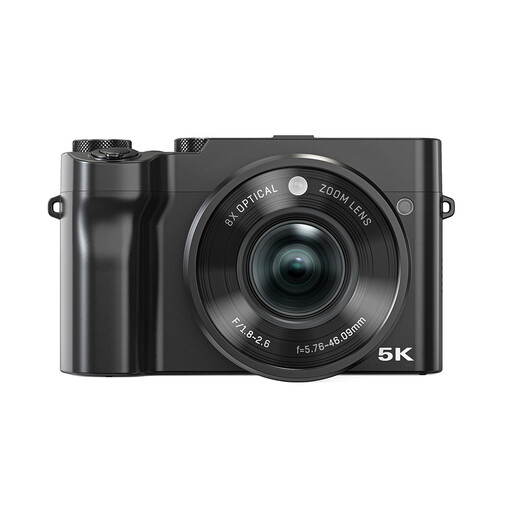
Why this product suits this profile: This model combines an advertised 8x optical zoom with front and rear cameras, making it suitable for travel photography, portraits and changing subjects.
The product specifications identify the zoom as optical zoom. Autofocus and electronic image stabilisation are also listed.
5K recording at 25 fps, a 64 MP specification, touchscreen, Wi-Fi, adjustable focus area and full-colour night vision according to the product description.
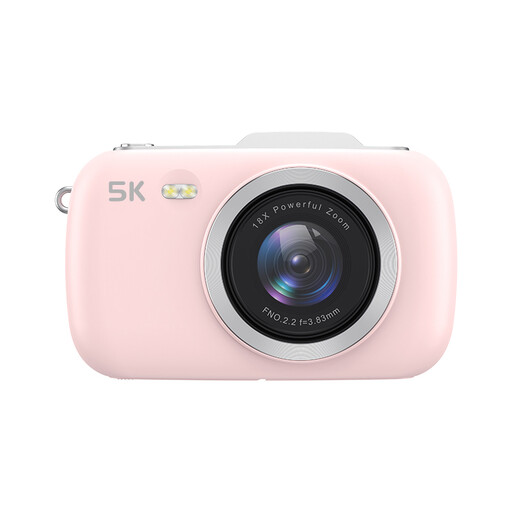
Why this product suits this profile: This compact point-and-shoot camera is designed for travel, straightforward photography and vlogging. Its advertised 18x zoom offers a wider advertised focal-length range for different subjects.
Before buying, check whether the 18x zoom is optical or digital. The “80 MP” designation should also be assessed as a manufacturer’s specification.
UHD video, a portable format and a point-and-shoot design aimed at beginners according to the product name.
We have put together a complete, regularly updated list of products that fully meet these strict selection criteria and the safety regulations applicable in the EU.
A compact camera with straightforward controls may be suitable for teenagers. The specific minimum age depends on the design, accessories and the manufacturer’s safety instructions. Children should not use the camera unsupervised with the battery, charging cable or memory card.
This depends on the bitrate, frame rate and recording format. 5K videos generally require more storage than Full HD recordings. For travel or longer recordings, we recommend a compatible memory card with sufficient capacity, along with regularly backing up your files.
In addition to the purchase price, you may need to pay for a memory card, spare battery, charging accessories, carrying case and, where applicable, an external microphone. With an affordable digital camera, you should therefore consider not only the price of the device, but also the equipment required for your intended use.