
当日/次日达

品质保障

开启新人专享福利: 全场免邮 | 低至 2 折 | 免费试用 30 天 JoyPlus 会员
下载 Joybuy
The market for high-performance 3D printers is filled with impressive technical specifications. However, many ambitious users—from engineers to designers—discover after purchase that the advertised capabilities hit practical limits. Two common pitfalls are:
This guide breaks down the crucial parameters that truly matter for successfully printing large, multi-colour, and engineering-grade models.
Before making a purchase decision, three technical aspects should be carefully examined. They determine whether a printer can meet your requirements for complex and durable components.
A large-volume 3D printer, such as one with a 350 x 350 x 350 mm build area, is essential for producing large prototypes or for the batch production of smaller parts. But volume alone is not enough. Engineering filaments like ABS, ASA, or PA-CF are prone to warping and cracking during uneven cooling. A 3D printer with an enclosure and an actively heated build chamber (e.g., up to 60°C) creates a thermally stable environment. This is a fundamental prerequisite for fully leveraging the mechanical properties of these materials and ensuring reliable layer adhesion across the entire part.
A fast FDM printer is defined not just by its maximum speed (mm/s), but critically by its acceleration (mm/s?) and the stability of its mechanical structure. Models with a CoreXY kinematics system and a robust die-cast aluminium frame provide the necessary rigidity to remain precise even at high accelerations. Look for features like automatic levelling with tilt compensation (Anti-Tilt Leveling), as this function ensures the first layer adheres perfectly—the foundation for every successful print.
A true multi-colour 3D printer goes beyond simply swapping filaments. Systems like the Creality Filament System (CFS) offer an automated solution for 16-colour 3D printing. Such a system manages up to four spools per unit, actively dries the filament, identifies material and colour via RFID, and ensures a clean switch between materials. This is especially important when you want to print complex models with different colours or soluble support material. For processing abrasive materials, as with a carbon fibre 3D printer, a hardened hotend (e.g., up to 350°C) is also essential to prevent premature nozzle wear.
The choice of the right printer depends on specific project requirements. Here are some configurations tailored to different user profiles.
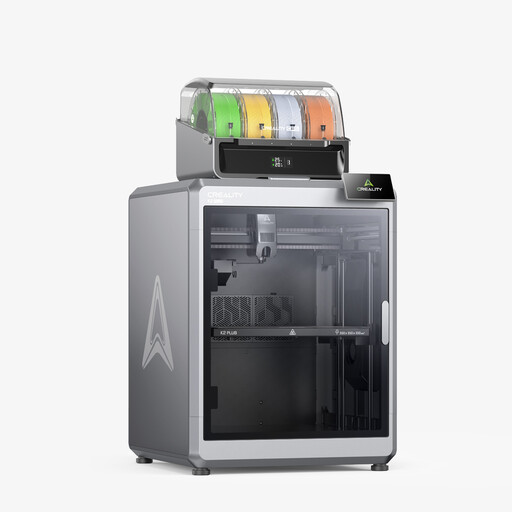
Why This Fits Their Persona: Ideal for users who need to produce large, functional prototypes and complex, multi-colour models without compromise. The combination of a large build volume, high-temperature capability, and the expandable CFS system meets professional demands.
The actively heated chamber (up to 60°C) and the 350°C hotend enable reliable processing of PA-CF and ABS where other printers fail. The CFS system fully automates multi-colour printing.
Large Build Volume: 350×350×350 mm. 16-Colour Capable: Fully integrated CFS for complex multi-colour and multi-material prints. High-Temperature Ready: Suitable for engineering filaments like PA-CF.
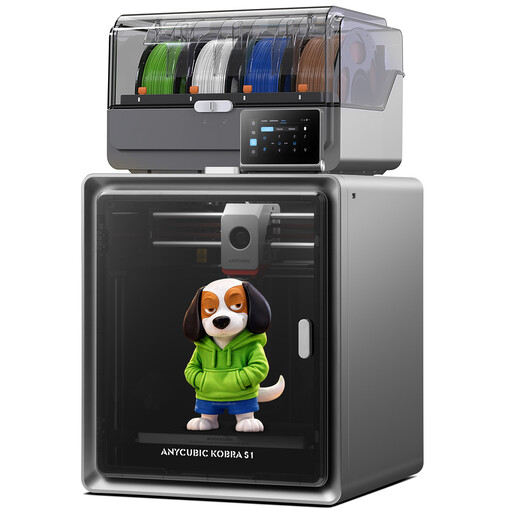
Why This Fits Their Persona: Suitable for users who want high print speeds and multi-colour capabilities in an enclosed system but don't need the maximum build volume of the K2 Plus. The focus is on fast, reliable results.
The fully enclosed CoreXY structure ensures thermal stability and precision at high speeds. The ACE 2 Pro system offers active filament drying, which increases reliability during multi-colour printing.
High Speed: Up to 600 mm/s thanks to the CoreXY structure. Active Filament Drying: The ACE 2 Pro system dries up to 65°C, even during printing. Expandable: Scalable from 4 to 16 colours.
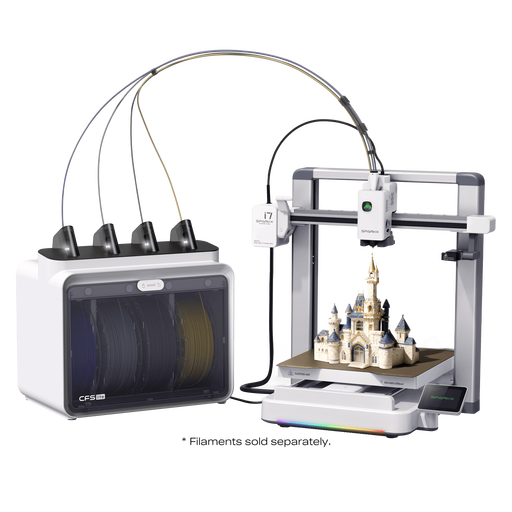
Why This Fits Their Persona: Perfect for hobbyists and creatives who want an easy entry into 4-colour printing. The focus is on simple operation and fast results right out of the box, without complex configuration.
This model is designed as a complete package for multi-colour printing. Instead of buying separate, often incompatible add-ons, users get a coordinated system designed for user-friendliness.
Quick Start: Ready to print in minutes without complex assembly. 4-Colour Printing: The CFS lite system is directly integrated. Easy Maintenance: Tool-free hotend quick swap in 5 seconds.
We've compiled a complete, up-to-date list of products that fully meet these strict selection criteria and UK safety regulations.
1. How important is an enclosure for a large-volume 3D printer? An enclosure is crucial for large-volume printers that process engineering materials like ABS, ASA, or PA-CF. It maintains a constant ambient temperature, minimises the risk of warping and cracking from uneven cooling, and significantly improves layer adhesion. For standard filaments like PLA, it is less critical but still beneficial for print quality.
2. Can the Creality K2 Plus Combo really print in 16 colours? Yes, the functionality is enabled by cascading up to four Creality Filament System (CFS) units. Each CFS unit can manage four different filaments. By connecting four of these units, the printer can automatically access and switch between up to 16 different colours or materials, enabling complex and detailed prints.
3. What maintenance does a fast FDM printer require? Regular maintenance is key to longevity and precision. This includes cleaning the nozzle and print bed to remove residue, checking the belt tension of the X and Y axes, and lubricating the guide rails and rods. For printers that process abrasive materials like carbon fibre, the hardened steel nozzle should be regularly inspected for wear and replaced when necessary.