
Lieferung heute & morgen

Qualitätsgarantie

Willkommens-Angebote freischalten: KOSTENLOSE Lieferung | Bis zu 80 % RABATT | Kostenlose 30-Tage-JoyPlus-Testphase
App herunterladen
A Phomemo label printer can save you a lot of work at home, in retail or on creative projects. Instead of writing labels by hand, you can print product names, prices, barcodes, QR codes or short messages straight from your smartphone. Most models are thermal label printers that work without ink and connect wirelessly via Bluetooth.
However, not every portable label printer is right for every task. The key considerations are not just the design and app features, but also the label width, consumables and the number of labels you plan to print.
Thermal printing doesn’t need ink cartridges or toner. This means less maintenance, but you’ll still need to pay for label rolls, sticker paper or thermal tape. Before you buy, check which roll sizes are compatible with the printer and whether the paper is self-adhesive or uncoated.
A small portable printer is handy for drawers, markets or selling on the go. However, its maximum print width may be too narrow for large postage labels or detailed product information. A printer that uses narrow tape is better suited to folder spines, cables, spice jars or small price stickers.
Templates, OCR, Excel import and barcode features are useful when they fit into your day-to-day routine. If you regularly label lots of items, look for batch printing, data import and a reliable Bluetooth connection too. For the occasional sticker or gift ribbon label, a simple app may be all you need.
Print width determines how much text and which codes will fit on a label. According to the product description, the Phomemo M110 supports label widths of 20 to 50 mm. This makes it useful for price labels, address stickers, product logos and inventory barcodes.
The Phomemo D30 is designed for labels that are 0.59 inches wide. That’s around 15 mm, making it suitable for narrow labels around the home or office. Before you buy, compare the available space with the actual width of the roll.
A Bluetooth label printer usually requires an app on your smartphone, tablet or computer. The M110 and D30 use the Print Master app. Depending on the model, they’re designed for iOS and Android devices. Before you buy, check that your smartphone is supported and that the app has the features you need.
Thermal paper reacts to heat. This means print can become less legible when exposed to high temperatures, direct sunlight or long periods in storage. If you’re labelling archive documents or items that need to be identified for a long time, check whether the specific thermal label is suitable for that purpose.
For compatible mini printers, Phomemo T02 thermal paper is available, for example. The self-adhesive paper is sold in a width of 50 mm, with a roll length of 3,5 m. It’s listed as compatible with the T02, Q02E, M02X and M02L. Always check compatibility against your printer model.

Why it suits this profile: This compact Bluetooth printer is designed for narrow labels around the home and office, and can be operated from a smartphone or tablet.
The specified width of 0.59 inches makes it easy to choose the right format. You can check before buying whether narrow labels will fit the space you have in mind.
Built-in battery, Bluetooth connectivity, and features for symbols, tables, barcodes and QR codes.

Why it suits this profile: The M110 supports a range of business uses, including price labels, product logos, address labels and inventory marking.
Support for widths from 20 to 50 mm means you’re less likely to be restricted to a single narrow format when labelling different products.
The Print Master app offers templates, Excel import, OCR, and tools for creating barcodes, QR codes and logos; the printer also has a built-in battery.
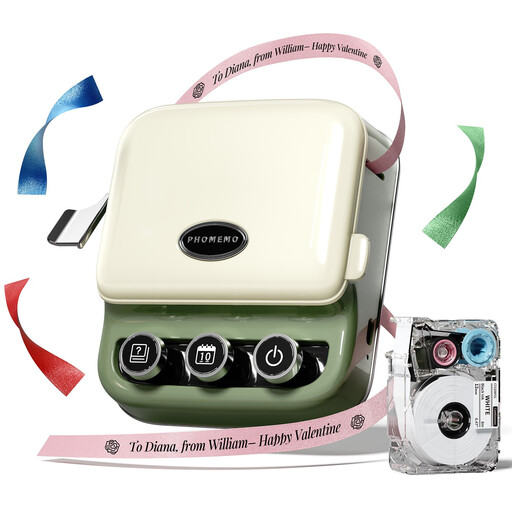
Why it suits this profile: This 2-in-1 device is designed for both standard labels and custom-printed gift ribbon labels.
The product description clearly states that separate ribbon tape is needed for printing on ribbons. Remember to include this consumable in your running costs.
Wireless Bluetooth connectivity, ink-free printing, and support for both labels and gift ribbon.
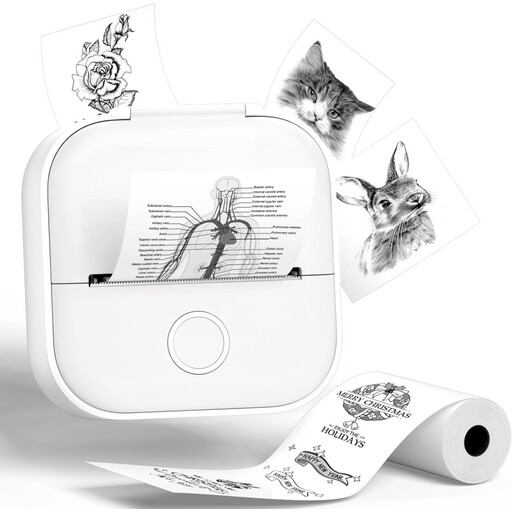
Why it suits this profile: Its mini size is ideal for study notes, small stickers, scrapbooking and quick labels on the go.
This is a mini printer designed for notes and stickers. If you don’t need wide postage or product labels, you can avoid buying a larger type of printer than you need.
Portable design and ink-free printing for stickers, study materials and short notes.
We’ve put together a complete, regularly updated list of products that meet these strict selection criteria and fully comply with the safety regulations in force in the EU.
First, install the Print Master app. Then connect the printer to your smartphone or tablet via Bluetooth. Insert a compatible label roll and select the format in the app. Print a test label to check that the alignment and text size are right.
How long they last depends on the material and storage conditions. Heat, direct sunlight, moisture and friction can all affect legibility. If you need to keep labels for a long time, follow the recommendations from the paper manufacturer.
As there’s no toner or ink to buy, regular costs are mainly for label rolls, self-adhesive thermal paper or ribbon tape for the P15. To work out the true cost, compare roll length, the number of labels per roll and the price of compatible consumables.