
Lieferung heute & morgen

Qualitätsgarantie

Willkommens-Angebote freischalten: KOSTENLOSE Lieferung | Bis zu 80 % RABATT | Kostenlose 30-Tage-JoyPlus-Testphase
App herunterladen
A Phomemo label printer can help you stay organised in your home office, print price labels for a small shop or personalise gift ribbon. Before buying, however, it is worth taking a close look at print width, app support and what is included. Compact devices can differ considerably in how they are used, even when product images and marketing claims initially appear similar.
A label printer without ink does not require ink cartridges or toner cartridges. However, you will still need consumables: label rolls, label tapes or special ribbon tapes must be purchased separately. Before placing your order, check which roll widths and consumables are compatible with the device.
A Bluetooth label printer works wirelessly, but generally requires a suitable app. The key factor is therefore not just the wireless connection, but also support for the smartphone or tablet you use. The Phomemo M110 and D30 connect via the Print Master App to iOS and Android devices. The P15 is also specified as supporting mobile devices, tablets and PCs.
A mini label printer fits in a bag, but does not automatically support wide product stickers. If you want to print barcodes, logos or prices for different products, check the maximum dimensions. According to the product details, the Phomemo M110 supports label widths from 20 to 50 mm. The Phomemo D30, on the other hand, is designed for a width of 0.59 inches.
Print width determines how much text and which graphics will fit on a label. A narrow format may be sufficient for cables, folders, spice jars or small storage boxes. Product information, larger price labels and barcodes require more space.
Also check whether a roll is already included. A label roll is listed for the Phomemo M110, as well as for the D30 and P15. For the P15, the description states that ribbon tape is available separately.
For occasional labelling, text, symbols and simple borders may be all you need. In an office, shop or warehouse, however, features such as Excel import, OCR text recognition, serial or batch printing and barcode creation can be highly useful.
According to the product details, the M110’s Print Master App offers more than 100 templates, Excel import, OCR, and options for logos, barcodes and QR codes. The D30 lists more than 1,000 symbols, over 60 borders, several fonts and additional features such as scanning, voice recognition and image recognition. Specific app features may vary depending on the operating system and app version.
A rechargeable label printer is more practical for market stalls, pop-up shops and changing workspaces than a device that must remain connected to the mains. Check how the battery is charged and whether the device will remain easily accessible throughout the working day.
Maintenance should also be factored into your calculations: rolls need to be inserted correctly, the app must be set up, and the device should be protected from moisture and extreme temperatures. According to the product descriptions, none of the three models featured here requires assembly.

Why this product suits this profile: The compact D30 is designed for simple labelling at home or in the office and connects to a smartphone or tablet via Bluetooth.
The fixed width of 0.59 inches makes it easy to understand which formats are available. Buyers can check in advance whether narrow labels are sufficient for folders, containers or cables.
Bluetooth connectivity, an integrated rechargeable battery, plus features for symbols, borders, barcodes, QR codes and Excel import.
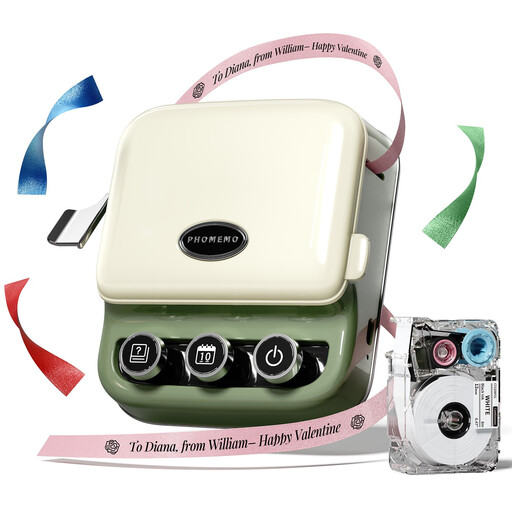
Why this product suits this profile: The P15 combines label printing with the option to print personalised gift ribbon. Its included gift-box design also suits users who value a tidy product presentation.
The product description clearly states that ribbon tape is available separately. This allows you to plan for the additional material requirements before buying.
2-in-1 functionality for labels and personalised gift ribbon; ink-free printing and Bluetooth connectivity to a mobile device, tablet or PC.

Why this product suits this profile: The M110 is aimed at small businesses, boutiques, bakeries, market stalls and home-office users who want to manage different label formats on the go.
The supported width of 20 to 50 mm is clearly specified. The description also mentions batch printing and Excel import, which can reduce manual work when producing many recurring labels.
Ink-free printing, an integrated battery, the Print Master App with templates, OCR, logos, barcodes and QR codes, plus mobile Bluetooth use.
We have put together a complete, regularly updated list of products that fully meet these strict selection criteria and the safety regulations applicable in the EU.
The models listed use ink-free printing technology. This means no cartridges or toner are required. However, you will need compatible label rolls or, for the P15, separately available ribbon tape. The exact durability of the printouts depends on factors including the material used and storage conditions.
The M110 and D30 are explicitly described as supporting barcode and QR-code labels. Designs are created using the Print Master App. For commercial use, check before printing that the size, contrast and data content are suitable for the relevant till system or inventory-management software.
The models listed here are described as having an integrated rechargeable battery. The available product details do not specify a precise runtime per charge. Actual battery life depends on printing frequency, connection, standby time and battery condition. For longer periods of use, check the charge level before starting work and keep the charging cable to hand.