
Lieferung heute & morgen

Qualitätsgarantie

Willkommens-Angebote freischalten: KOSTENLOSE Lieferung | Bis zu 80 % RABATT | Kostenlose 30-Tage-JoyPlus-Testphase
App herunterladen
A Phomemo label printer can simplify many labelling tasks at home, in the office, in retail or at a market stall. Whether you need labels for storage jars, folders, price stickers, address labels or products, the compact printer usually connects to a smartphone, tablet or, in some cases, a PC via Bluetooth.
Before buying, however, it is worth taking a close look at the technical specifications. Unclear app requirements, incompatible label tape or an insufficient print width can make a device less flexible in everyday use than expected.
A label printer without ink requires neither ink cartridges nor toner. This reduces the need for typical consumables and simplifies setup. However, label rolls or tapes are still required. Before buying, you should therefore check which tape widths and types are compatible with the model in question.
Thermal direct printing is also suitable for many organisational labelling tasks, but it should not be confused with a traditional colour printer. If you need coloured logos or multi-colour product labels, you should take the technical limitations of the device into account.
Many mobile models work via Bluetooth and require a suitable app. Depending on the product, the Phomemo system uses the “Print Master” application. It is important to check whether your smartphone or tablet is supported and whether the desired functions, such as Excel import, OCR, barcode or QR code creation, are available.
A Bluetooth label printer is therefore not automatically ready to use without preparation. Downloading the app, enabling Bluetooth and inserting the correct print medium are all part of the standard setup process.
An inexpensive printer can become impractical in the long term if its refills are unsuitable or difficult to find. Look out for:
For the Phomemo D30, for example, label tapes with different dimensions are available. These include versions measuring 0.47 × 1.57 inches and 0.55 × 1.57 inches. Before ordering, check the exact specifications against your own printer and intended use.
A slim portable label maker is suitable for short words, cable markers, spice jars or small storage boxes. For price labels, address stickers, product logos or longer descriptions, a wider print area may be more practical.
According to the product specifications, the Phomemo M110 supports label widths from 20 to 50 millimetres. This provides greater flexibility for use in retail, boutiques, bakeries or stock organisation.
A rechargeable label printer is particularly useful when labels need to be created away from a permanent desk setup. For market stalls, pop-up shops or stocktaking, the battery solution should match the planned print volume. Statements such as “long battery life” are only partly comparable without specific usage conditions. Check whether the device has a built-in battery and how it is intended to be charged.
For simple name and organisational labels, text, symbols and different fonts are usually sufficient. Business users may require additional options such as:
When printing labels with a smartphone, it is also important to check whether the app is available for iOS and Android, and which functions are actually supported by the model in question.
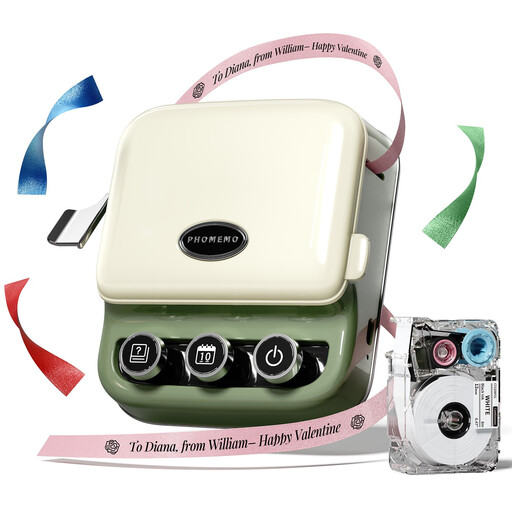
Why this product suits this profile: The P15 combines label printing and personalised ribbon printing in one compact device. It is aimed at households and occasional users who want to get started without ink or toner.
The required Print Master app and wireless connection are clearly stated in the product specifications. A blank label tape is included; ribbon is available separately.
Bluetooth connection; 2-in-1 functionality for labels and personalised ribbon printing; no ink or toner consumption.

Why this product suits this profile: The D30 combines a mini format with a wide range of design features. It is ideal for users who regularly label folders, supplies, cables or household items individually.
Compatible D30 label tapes are available in different dimensions. This allows you to select the desired tape width before ordering.
Built-in rechargeable battery; Bluetooth; over 1,000 symbols, more than 60 frames, plus functions for barcodes, QR codes, OCR and Excel import.

Why this product suits this profile: The M110 is designed for product labelling and mobile business workflows. It is suitable for boutiques, bakeries, retailers, market stalls and ongoing stock organisation.
The supported width of 20 to 50 millimetres is clearly specified. This makes it easier to plan its use for price, address, logo and stock labels.
Supports batch printing, Excel import, OCR, barcodes, QR codes and logos; built-in battery; compatible with iOS and Android devices.
Suitable refills for the Phomemo D30 are available in several widths: 0.47 × 1.57 inch label tape for D30 and 0.55 × 1.57 inch label tape for D30. Your choice should be based on the desired font size, the available adhesive area and the space provided on the item.
We have put together a complete, regularly updated list of products that fully meet these strict selection criteria and the safety regulations applicable in the EU.
First, install the Print Master app. Then switch on the printer, connect it to your smartphone or tablet via Bluetooth and insert the appropriate label tape. Create the layout in the app and then transfer it to the printer. The available functions vary by model.
There is no single answer for the operating life. It depends on factors including charging cycles, printing frequency, storage and ambient temperature. For daily use, the battery should be charged according to the manufacturer’s instructions, and the device should be protected from moisture and extreme temperatures.
As no ink or toner is required, the main costs are for label rolls or tapes. Actual expenditure depends on the format, pack size, material and print volume. Comparing the price per roll or per label is more meaningful than looking only at the printer’s purchase price.