
Lieferung heute & morgen

Qualitätsgarantie

Willkommens-Angebote freischalten: KOSTENLOSE Lieferung | Bis zu 80 % RABATT | Kostenlose 30-Tage-JoyPlus-Testphase
App herunterladen
A portable monitor can give you more screen space when working from home, travelling for business, studying or gaming, without having to carry a permanently installed display with you. However, product specifications can vary considerably. A budget portable monitor may be lightweight, for example, but could require an additional power adapter. A USB-C monitor may allow connection with just one cable, but it will not necessarily work with every USB-C port.
Before buying, you should therefore look beyond screen size and resolution. The key factors are ports, power supply, compatibility, weight and your intended use.
Many users assume that every USB-C port outputs a video signal. This is not the case. To transmit video, the port on your laptop, smartphone or tablet must support what is known as DisplayPort Alternate Mode or a comparable video output standard.
You should therefore check:
Devices with multiple USB-C ports may also assign different functions to each port. The source device’s user manual is therefore the decisive reference.
A portable FHD monitor with 1920 × 1080 pixels is sufficient for office applications, video calls and many games. Higher resolutions display more detail, but place greater demands on the graphics card, cable and power supply.
A portable 4K monitor may be interesting for photo editing or displaying high-resolution content. For basic text work on the move, however, the additional resolution may mean more weight, higher energy consumption or a higher purchase price. What matters is whether your laptop or console can actually output the desired resolution.
A very lightweight monitor is convenient when travelling. However, check whether this means it lacks ports, a stand, speakers or a sturdy cover. For a portable laptop monitor, the design should also be suitable for your device. A model with an integrated mount for 13- to 17.3-inch laptops will not automatically suit every laptop design.
Pay attention to the weight of the monitor including accessories, the carrying case and the stability of the stand. A glossy surface can also cause reflections, while a matt surface is often more practical in changing lighting conditions.
14 inches are suitable if you want to keep transport as compact as possible. Sizes from 15.6 to 16.1 inches provide more room for spreadsheets, code windows or games. A 17.3-inch model is more comfortable to use, but takes up more space in your rucksack.
A 16:10 screen displays slightly more content vertically than a conventional 16:9 panel. This can be helpful when reading lengthy documents or programming. For consoles and many videos, however, 16:9 is the more common format.
An IPS monitor generally offers wide viewing angles. Product specifications often include values such as 178 degrees, brightness in cd/m² and information about the colour gamut, such as sRGB. These figures should be treated as technical guidance, not as a guarantee of a particular colour experience.
For bright indoor spaces, 250 to 300 cd/m² is often relevant. Creative users should also consider colour gamut, colour depth and connection quality. A wide colour gamut alone cannot replace calibrated colour reproduction.
A monitor with HDMI and USB-C is more versatile than a model with just one connection standard. HDMI is particularly suitable for PS4, PS5, Xbox, PCs and devices without a video-capable USB-C port. With compatible laptops, USB-C can enable video transmission, power supply and data transfer over a single cable.
Before buying, check the following for Nintendo Switch, smartphones and consoles:
For gaming, the refresh rate also matters. 60 Hz is sufficient for many applications. A portable gaming monitor with 120 or 144 Hz can display smoother movement when used with compatible hardware. However, the console or computer must also be capable of outputting this refresh rate.
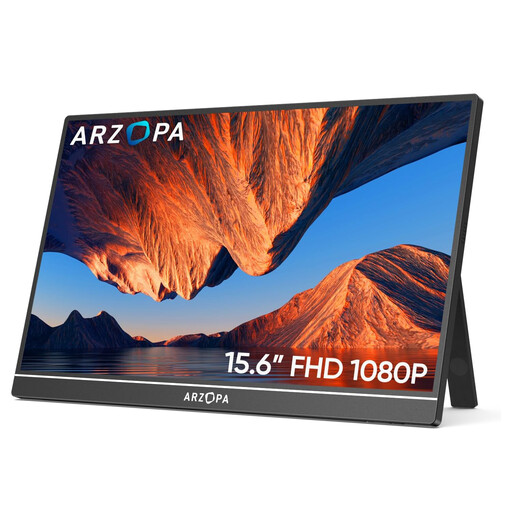
Why this product suits this profile: The combination of a 15.6-inch screen, FHD resolution and a weight of 780 g is suitable for students, home workers and travellers looking for an uncomplicated second screen.
USB-C and HDMI are available. Nevertheless, check whether your USB-C port supports video signals and whether an additional power supply is needed when using HDMI.
1920 × 1080 pixels, IPS panel, 60 Hz, two USB-C ports and an HDMI input.
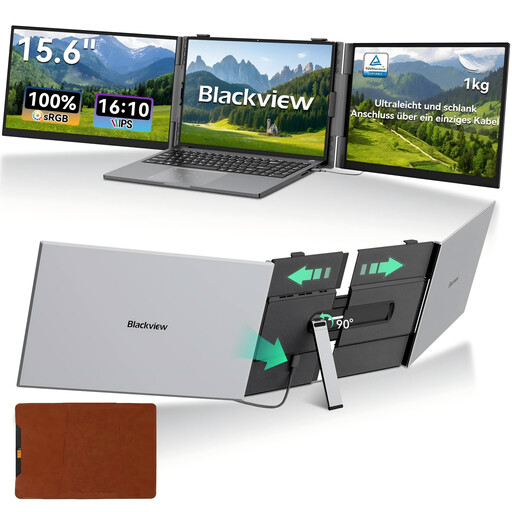
Why this product suits this profile: Professionals who frequently switch between the office, home and travel benefit from its design as a laptop screen extension and its 16:10 format.
The technical specifications list two full-featured USB-C ports, 1920 × 1200 pixels and a supplied 30-watt adapter. Specific laptop compatibility should be checked before buying.
16:10 IPS panel, 100% sRGB according to the product specifications, 300 cd/m², integrated speaker and a weight of 1.2 kg.
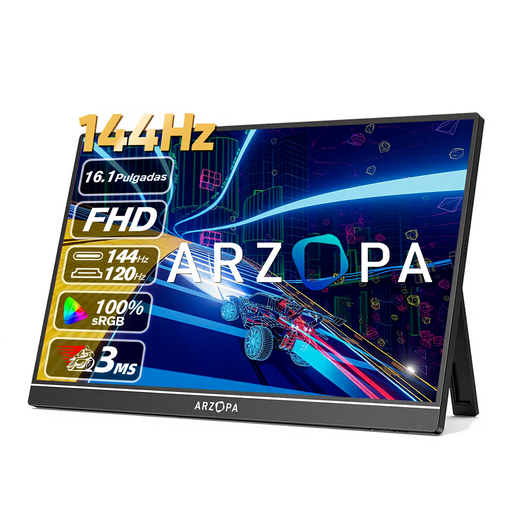
Why this product suits this profile: For gamers looking for a mobile screen for a laptop, PC, PS5, Xbox or Switch, the key features here are 144 Hz and multiple inputs.
The refresh rate is specifically stated as 144 Hz. To achieve this, the source device, cable and game settings must all support this rate.
16.1-inch IPS panel with 1920 × 1080 pixels, two USB-C ports, HDMI, 300 cd/m² and a weight of 780 g.
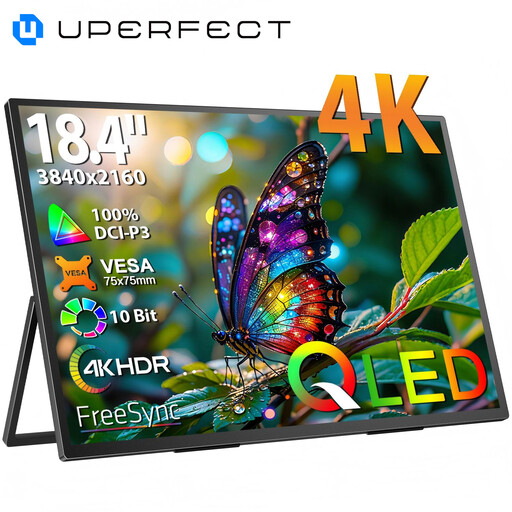
Why this product suits this profile: The larger screen is aimed at users who work on the move with extensive files, images or multiple windows and need more room to do so.
The 4K resolution is specified as 3840 × 2160 pixels. Due to the higher data volume, you should check the output capability of the source device and the power supply.
18.4-inch QLED display, 3840 × 2160 pixels, 178-degree viewing angle and integrated mount according to the product description.
We have put together a complete, regularly updated list of products that fully meet these strict selection criteria and the safety regulations applicable in the EU.
For a portable screen extension on Windows, select the ‘Extend’ display option after connecting the monitor. On macOS, you can find this setting in the display system settings. With HDMI, the image is usually transmitted directly, while USB-C can also provide power.
The situation varies depending on the model when using smartphones and games consoles. A USB-C port on a phone does not necessarily support an external display. Depending on how it is used, the Nintendo Switch requires a suitable power supply or docking solution. For PS5 and Xbox, the monitor should have the appropriate HDMI input.
Place the device on a firm, level surface and ensure adequate ventilation. Use only suitable power adapters and cables, or those supplied with the monitor. Clean the screen with a soft, dry cloth and protect it from moisture and direct heat.
The easiest option is to use a full-featured USB-C port that supports video transmission. Alternatively, use HDMI for the picture and USB-C or USB-A for power. Check the required cables and support for the relevant operating system before buying.
Its service life depends on factors including transport, heat generation, cable quality and daily operating time. A sturdy protective case, dry storage and good ventilation reduce the risk of mechanical or heat-related damage. Warranty and replacement terms vary depending on the product and supplier.
Power consumption is usually lower than that of a large desktop monitor, but depends on brightness, resolution, speakers and refresh rate. When powered via USB-C, your laptop battery may run down more quickly. For longer periods of use away from home, a power bank or suitable power adapter is therefore useful, provided the monitor supports this power source.