
Lieferung heute & morgen

Qualitätsgarantie

Willkommens-Angebote freischalten: KOSTENLOSE Lieferung | Bis zu 80 % RABATT | Kostenlose 30-Tage-JoyPlus-Testphase
App herunterladen
The QIDI Q2 3D printer is aimed at makers, educational institutions, designers, engineers and anyone looking for an enclosed FDM 3D printer for technical or multi-colour projects. However, a high print speed alone doesn’t determine whether a machine will suit your needs in everyday use. The key factors are build volume, temperature control, material compatibility, calibration and ongoing running costs.
The 3D printer 600 mm/s specification refers to a possible peak speed under certain settings. Lower speeds may be more suitable for large parts, complex geometries or technical filaments. High acceleration values also place greater demands on the frame, belts, surface finish and stability.
So, don’t focus solely on maximum speed. Also consider:
A 3D printer with a heated build chamber can help maintain stable temperatures when printing certain technical filaments. However, that doesn’t mean every high-performance material can be printed without difficulty. The filament type, nozzle diameter, build plate, drying and ambient temperature all need to work together.
The QIDI Q2 is listed as having a 65 °C heated chamber. If you plan to use ABS, ASA, PC or composite materials, also check that the specific filament is approved for these conditions and find out which build plate you’ll need.
According to the product details, the optional QIDI BOX adds multi-colour and multi-material printing in up to 16 colours to the Q2. Before buying, check whether the version you want already includes the QIDI BOX. Filament diameter, the drying function, spool compatibility and the extra space required are also important considerations.
Changing materials for multi-colour printing can create more waste and extend print times. So, if you’re printing single-colour technical parts, this extra feature may not be essential.
The listed 270 x 270 x 256 mm build volume is suitable for medium-sized functional parts, enclosures, prototypes and models. Check the dimensions of the designs you typically print before buying. Even if a part just fits within the build volume, it may still be impossible to print once you account for edge margins, a brim or support structures.
You should also plan where to put the printer. An enclosed printer needs enough space around it for ventilation, maintenance and opening the door.
The QIDI Q2 model is described as having an all-metal 370 °C hotend. This temperature range generally allows you to print a wider selection of filaments. Depending on the manufacturer’s recommendations, these may include PLA, PETG, ABS, ASA, TPU and fibre-reinforced materials.
For a 3D printer for carbon-fibre filament, nozzle wear resistance is especially important. Standard brass nozzles can wear out more quickly when exposed to abrasive carbon-fibre particles. Check whether a hardened or otherwise wear-resistant nozzle is included, or whether you’ll need to buy one separately.
Automatic levelling reduces the amount of manual setup required, but it doesn’t eliminate every preparation step. The build plate must be clean, correctly fitted and free from warping. The QIDI Q2 is listed as using a nozzle-sensor levelling system. Before your first print, you should still check the build plate, choose the right print profile and test adhesion with a small object.
Other practical features listed in the product description include filament run-out and tangle detection, camera monitoring and print recovery after a power cut. Whether these features are useful for your workflow depends on print duration, where you place the printer and how closely you want to monitor it.
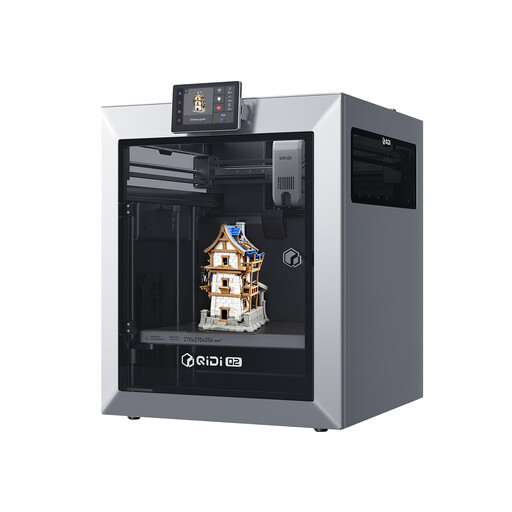
Why this product suits this profile: Its enclosed design, automatic levelling and listed build volume of 270 × 270 × 256 mm provide a solid starting point for getting into FDM printing.
The choice isn’t based on 600 mm/s alone. It also takes the heated chamber, calibration and available build volume into account.
65 °C heated build chamber, 370 °C hotend and automatic levelling, according to the product details.
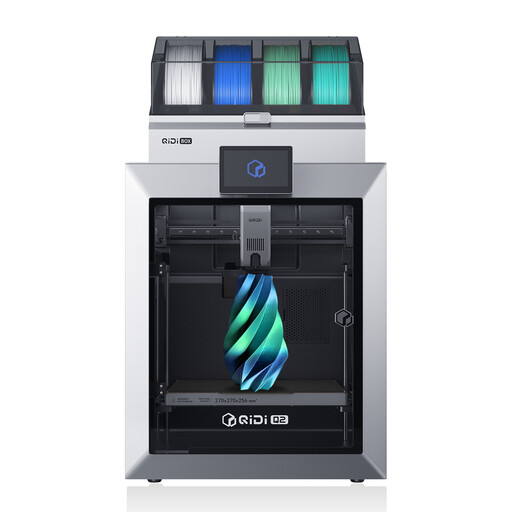
Why this product suits this profile: This combination is for users who want one system for both technical materials and optional multi-colour projects.
The QIDI BOX is explicitly included in the product name for this version, making it easier to check exactly what’s included before you buy.
Multi-colour and multi-material printing in up to 16 colours, plus drying during printing, according to the product description.
Why this product suits this profile: Its enclosed design, heated chamber and material options make it a practical choice for regular prototyping, functional parts and training projects.
Before using abrasive filaments, you can check the nozzle, filament approval and print profile carefully, rather than relying on material claims without checking them.
Up to 600 mm/s, a 65 °C heated chamber, 370 °C hotend and filament monitoring, according to the product specifications.
We’ve put together a complete, regularly updated list of products that meet these strict selection criteria and fully comply with the safety regulations in force in the EU.
On top of the purchase price, you’ll need to budget for filament, nozzles, build plates and, where necessary, replacement parts. A heated chamber and a 370 °C hotend can use more electricity than a basic open-frame FDM 3D printer. For long print jobs, the power consumption of the heating system is also worth considering.
For reliable operation, you should:
The listed 3-in-1 air filtration system, with a pre-filter, HEPA filter and activated carbon filter, should be viewed as a technical feature. It doesn’t replace adequate room ventilation or the need to follow the safety instructions from the filament and printer manufacturers.
Automatic levelling, an enclosed design and the quick setup mentioned in the product description can make it easier to get started. Beginners should start with PLA or PETG, then move on to more challenging materials such as ABS, ASA or carbon-fibre composite filaments.
The model is described as supporting a wide range of filaments, including carbon-fibre composites. Before printing, however, check the specific material approval, suitable nozzle, build plate and recommended temperatures. Carbon-fibre filament can cause greater wear on standard nozzles.
Ongoing costs depend mainly on filament use, print duration, electricity prices, maintenance intervals and nozzle wear. The optional QIDI BOX can mean more material changes, and therefore greater filament use, when printing in multiple colours. For a more accurate estimate, calculate the cost per part rather than comparing purchase prices alone.