
Lieferung heute & morgen

Qualitätsgarantie

Willkommens-Angebote freischalten: KOSTENLOSE Lieferung | Bis zu 80 % RABATT | Kostenlose 30-Tage-JoyPlus-Testphase
App herunterladen
A TPMS diagnostic tool needs to do more than just display a tyre pressure reading. For tyre centres, garages and auto electricians, the key factors are suitable vehicle coverage, reliable sensor activation and a clear diagnostic process. Even experienced car owners should check before buying whether the tool works with their vehicle and the sensors in use.
Many poor purchases happen not because of a lack of features, but because of unclear compatibility information. A tool might support 315 MHz and 433 MHz, for example, but only program certain families of programmable sensors. Other models can activate OE sensors but cannot program universal replacement sensors.
The term “universal” often refers to vehicle coverage or the activation of different sensors. It does not necessarily mean that every replacement sensor model can be programmed. Before ordering, you should therefore check three things:
With the XTOOL TP150, programming is, according to the product details, designed for XTOOL TS100 sensors. The tool can read other OE sensor information, but programming relates to the XTOOL sensor family mentioned.
A simple TPMS reset tool can reset the warning light under certain conditions. If the underlying cause remains – for example, a faulty sensor, an unlearned sensor ID or a communication fault – the warning may reappear.
A sensible diagnostic process should therefore include:
New vehicle models and changes in sensor coverage can require regular software maintenance. A tool with Wi-Fi or USB updates is more practical in daily workshop use than a model that can only be updated through a complicated computer process.
Also pay attention to the menu navigation, available languages, battery life and the ability to save test data. These points affect your workflow more than individual marketing claims.
A TPMS sensor activation tool sends a signal to the sensor so that it transmits its data. Depending on the vehicle and sensor, the radio frequency may vary. A 315 MHz 433 MHz TPMS tool covers both commonly mentioned frequency ranges, but does not replace checking specific vehicle compatibility.
When activating, the tool should be held at the distance recommended by the manufacturer from the valve. For the XTOOL TP150, this is stated as approximately 15 centimetres. According to the product description, the following information is read out, among other things:
An OBD2 TPMS tool connects to the vehicle via the OBD2 port. Depending on the vehicle, this allows you to read and clear TPMS fault codes, check stored sensor IDs and start relearn processes.
The TPMS relearn tool should support at least the procedures relevant to your vehicle. Depending on the vehicle, these include:
Not every vehicle accepts every procedure. The vehicle’s owner’s manual and the tool’s compatibility list therefore remain the definitive sources.
A tyre pressure sensor programming tool writes data onto a programmable sensor. This can be done via an automatically generated ID, manual ID entry, activation of the old sensor or access to the TPMS control unit.
When buying, it is crucial whether you only want to diagnose existing sensors or also program replacement sensors. According to the supplier, the XTOOL TP150 supports four programming methods for XTOOL TS100 sensors. The Autel tool is, according to the product description, intended for Autel MX sensors. This compatibility should be factored into ongoing material costs.
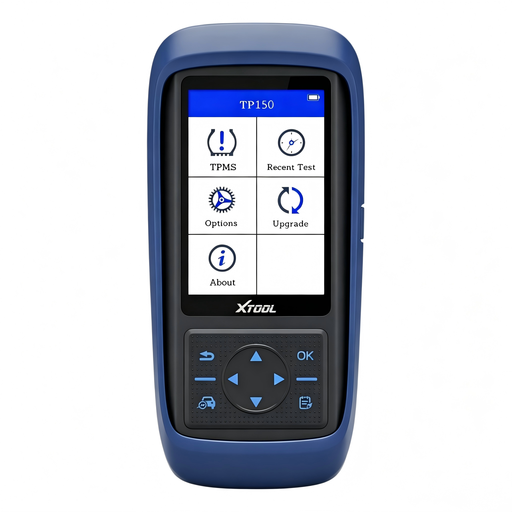
Why this product fits the profile: This tool combines sensor activation, TPMS diagnostics and programming of XTOOL TS100 sensors in one compact workflow.
The supported frequencies of 315 MHz and 433 MHz, as well as the target sensor family, are clearly stated. This makes it easier to check suitability before buying.
Wi-Fi and USB updates, 3.95-inch TFT display, rechargeable 3.7 V battery and 13 selectable languages.
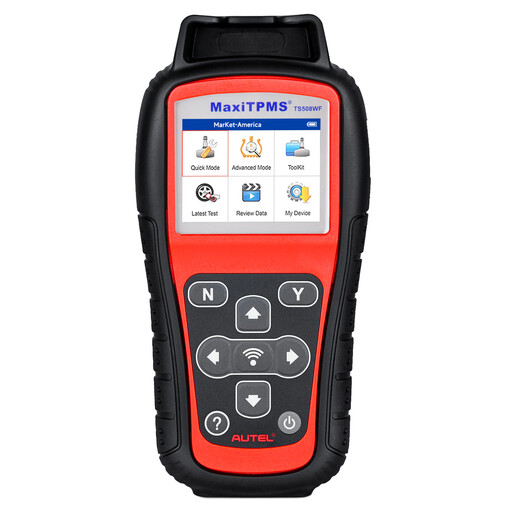
Why this product fits the profile: The range of diagnostic, activation and relearn procedures suits users who want to choose workflows based on vehicle type.
Quick Mode and Advanced Mode separate simple service tasks from more extensive diagnostic steps. The details on MX sensor compatibility prevent a vague universal claim.
According to the product description, it supports various relearn procedures, OBD2 diagnostics, MX sensor programming and Wi-Fi and USB updates.
Why this product fits the profile: Tyre and tyre service centres can choose between quick installation and detailed diagnostics, and can recall saved test data.
The product description names specific diagnostic and relearn methods rather than just a vague reset promise. The MX sensor compatibility should be factored in beforehand.
Activation of known TPMS sensors, display of ID, pressure, temperature and battery data, plus documentation and print function according to supplier information.
We have put together a complete, regularly updated list of products that fully meet these strict selection criteria and the safety regulations in force in the EU.
Before diagnosis, the vehicle should be safely parked and the ignition switched on according to the instructions. The tool must not be used while driving. When programming a sensor, the following sequence is recommended:
If warnings keep recurring, do not keep resetting them. Instead, check the sensor battery, valve, wiring, antenna and control unit. A TPMS diagnostic tool provides information to help narrow down the issue, but does not replace a mechanical inspection or professional fitting.
No. Activation and programming are different functions. Many tools can read numerous OE sensors, but only program a specific series of replacement sensors. Therefore, check the details for XTOOL TS100, Autel MX sensors or other explicitly named sensors.
The lifespan depends on factors including the sensor design, usage, temperature and vehicle. A TPMS tool can display the battery status, but does not provide a definitive remaining life. If values are unusual, the sensor should be replaced after a professional inspection.
Possible ongoing costs arise from replacement sensors, fitting, updates or accessories. With tools that offer described free software updates, an update fee may not apply; the cost of compatible programmable sensors remains separate. Check the update terms and the compatible sensor family before buying.