
Lieferung heute & morgen

Qualitätsgarantie

Willkommens-Angebote freischalten: KOSTENLOSE Lieferung | Bis zu 80 % RABATT | Kostenlose 30-Tage-JoyPlus-Testphase
App herunterladen
The USB-C port has become the standard for most modern laptops, tablets, and smartphones. It promises a universal solution for charging, data transfer, and connecting accessories. Yet, the search for the right USB-C adapter can quickly become overwhelming. Many products don't deliver on their promises, leading to frustration and unnecessary expense.
As your Joybuy Product Recommendation Officer, I'll help you identify the common pitfalls and make an informed decision. We'll focus on the facts so you can find the exact adapter that meets your needs.
Before you spend any money, you should be aware of the most common issues that arise with low-quality or falsely advertised adapters.
To avoid these traps, you should check three core technical aspects. These determine whether an adapter is suitable for your use case.
Not every USB-C port is created equal. The supported standards are crucial for performance.
The Power Delivery feature allows a notebook to be charged through the same USB-C port that the adapter is connected to.
Think carefully about which ports you need now and in the future.
Based on these objective criteria, we have identified a few products that represent a suitable solution for specific user profiles.
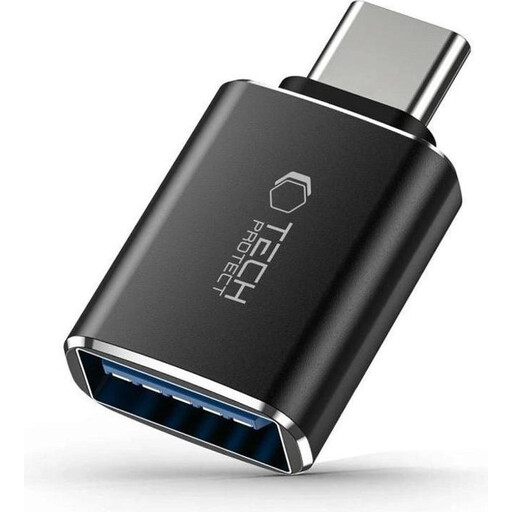
Why it's a match: Ideal for users who want to solve a single, clearly defined problem: connecting an older USB-A device (like a flash drive, mouse, or keyboard) to a modern device with a USB-C port.
This product avoids the complexity and potential compatibility issues of a multi-port hub. It focuses on one function and performs it reliably, without making false promises.
Supports OTG functionality for direct connection to smartphones and tablets. Its compact and robust design makes it a hassle-free companion.
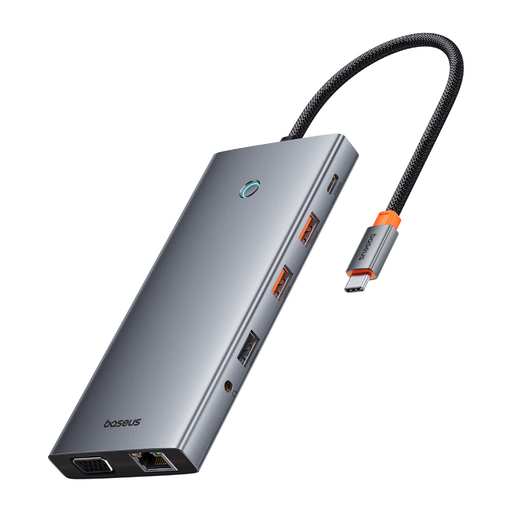
Why it's a match: For power users in the home office or at work who want to turn a laptop into a full-fledged workstation. It allows for connecting up to four monitors and numerous peripherals.
The aluminium alloy housing ensures effective heat dissipation, preventing overheating. The detailed technical specs (e.g., 10 Gb/s, 8K video, 100W PD) provide transparency and prevent disappointment from false performance claims.
Massive port variety, including DisplayPort and VGA for maximum compatibility. Powerful 100W Power Delivery for charging demanding notebooks.
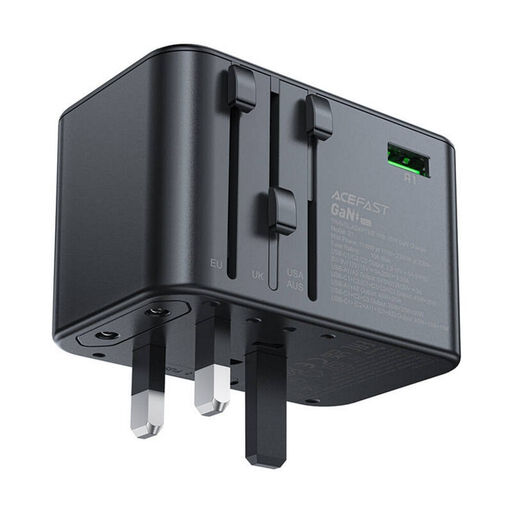
Why it's a match: The all-in-one solution for anyone who travels internationally. This device combines a powerful 75W charger with a universal adapter for the most common socket systems worldwide.
It replaces a bag full of individual chargers and plug adapters, minimising the risk of incompatibility and luggage clutter. GaN technology ensures high efficiency and low heat generation in a compact form factor.
Integrated plugs for the EU, UK, USA, and AUS. Five charging ports (3x USB-C, 2x USB-A) to simultaneously charge multiple devices.
We have compiled a complete, up-to-date list of products that fully meet these strict selection criteria and rigorous safety standards.
1. How do I know if a USB-C adapter is compatible with my MacBook? Check your MacBook's specifications. Newer models (especially MacBook Pro) feature Thunderbolt 3 or Thunderbolt 4 ports. To use their full potential (e.g., for two 4K monitors), you'll need a compatible Thunderbolt 3 adapter or docking station. For simple tasks like connecting a USB-A drive, a standard USB-C adapter will suffice. For video adapters, always check the manufacturer's compatibility list.
2. Can a USB-C hub damage my laptop? A high-quality hub from a reputable manufacturer poses no risk when used correctly. Dangers arise from low-quality products that overheat or provide an unstable power supply. Look for features like an aluminium housing for heat dissipation and check that the hub's Power Delivery output (in watts) is sufficient for your laptop. Do not overload the hub with too many power-hungry devices.
3. What is the difference between a USB-C hub and a USB-C docking station? The lines are blurry, but there is a fundamental distinction. A USB-C hub is typically smaller, portable, and powered directly by the laptop's USB-C port (bus-powered). A USB-C docking station is usually larger, designed for stationary use at a desk, and has its own external power supply. This allows it to offer more and more powerful ports and ensure a more stable power supply for the laptop and all connected devices.