
Lieferung heute & morgen

Qualitätsgarantie

Willkommens-Angebote freischalten: KOSTENLOSE Lieferung | Bis zu 80 % RABATT | Kostenlose 30-Tage-JoyPlus-Testphase
App herunterladen
Modern laptops like the MacBook Pro or Dell XPS favour a minimalist design with few ports. For professionals and creatives who rely on a multitude of peripherals in their home office or at a professional workstation, this poses a challenge. A high-performance 14-in-1 USB-C hub promises to solve this problem with a single cable. However, the market is flooded with products featuring misleading specifications. This guide highlights the crucial criteria for selecting a reliable USB-C docking station.
Published by the Joybuy Product Recommendation Officer on July 28, 2026
Many users invest in a hub only to find that it doesn't meet their needs. Watch out for these three common problems to avoid a bad purchase.
To make an informed decision, you should carefully examine three core technical features. These define the performance and reliability of your future home office accessories.
For professional users, a smooth display is essential. Ensure the hub explicitly supports 4K 60Hz via USB-C to HDMI or DisplayPort. This guarantees a clean and responsive display.
If you're looking for a laptop docking station for 3 monitors, support for MST (Multi-Stream Transport) is critical.
The charging function is one of the core competencies of a good docking station. A 100W Power Delivery port is the standard for high-performance notebooks. Check the datasheet for the "net charging power" or the hub's self-consumption. A high-quality hub ensures that enough power remains for fast laptop charging, even when all ports are occupied. A robust aluminium housing aids in heat dissipation and ensures stable operation.
The variety and speed of the ports determine the hub's practical utility.
Based on the criteria above, we have compiled a selection of products suited for specific user groups.
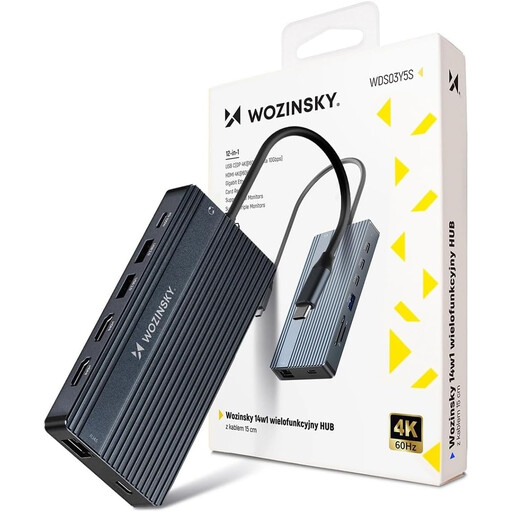
Why it's a great fit: For users who refuse to compromise. This hub transforms a laptop into a full-fledged workstation with connectivity for up to three monitors, high-speed internet, and all common peripherals. Ideal for power users and complex home office setups.
Explicitly supports 4K@60Hz and MST for Windows systems. The robust aluminium housing ensures good heat dissipation and prevents performance throttling. The 100W PD port is designed for demanding laptops.
Comprehensive connectivity with 14 ports, including 2x HDMI, 1x DisplayPort, Gigabit Ethernet, and multiple USB 3.0 ports. Plug-and-play functionality without driver installation.
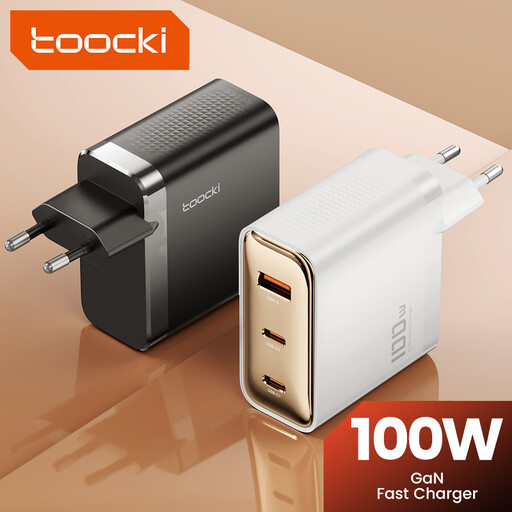
Why it's a great fit: A 14-in-1 hub needs a powerful source. This GaN charger delivers the required 100W to power the hub and the notebook at full capacity. It's the necessary companion to unlock the docking station's full potential.
Prevents the performance bottleneck caused by an underpowered adapter. It ensures that the hub's advertised 100W Power Delivery can actually be utilised without the charging performance dropping.
Compact design thanks to GaN technology. Offers additional flexibility with three ports (2x USB-C, 1x USB-A) for charging other devices like a smartphone or headphones.
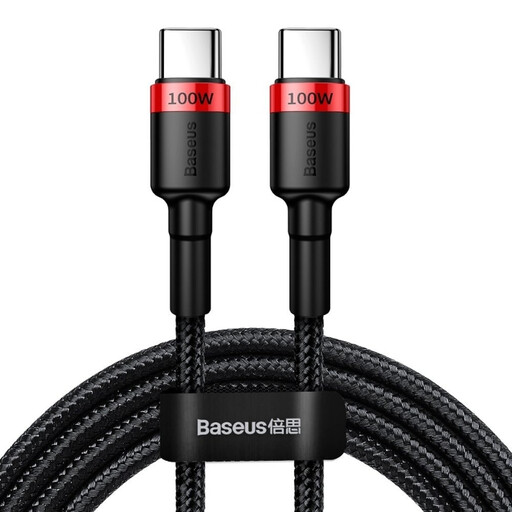
Why it's a great fit: The connection between the power adapter, hub, and laptop is crucial. This cable is designed for high power and ensures the entire chain functions stably. For users who know that reliability is in the details.
Bypasses the problem of non-specified cables that cannot handle 100W of power, leading to charging interruptions or slow data transfer. This cable is explicitly rated for 100W (20V/5A).
The high-density braided jacket and reinforced aluminium connectors offer superior durability and protect against cable breakage from daily use.
We have compiled a complete, up-to-date list of products that fully meet these strict selection criteria and safety standards.
Yes, for full functionality, an external power supply is highly recommended. Especially if you plan to use the 100W Power Delivery charging feature and connect multiple peripherals like monitors and hard drives, a separate, high-power USB-C power adapter (ideally 100 watts) is required. Without it, the hub may not be able to stably power all devices while simultaneously charging the laptop.
That depends on the MacBook model. MacBooks with standard Apple Silicon chips (e.g., M1, M2, M3) often natively support only one external monitor. The Pro, Max, or Ultra variants of these chips support more. However, a critical point is that macOS does not support MST (Multi-Stream Transport) through a single USB-C port. Therefore, most hubs will only mirror the external displays on a Mac instead of extending the desktop. A true setup with three extended monitors on a Mac often requires a special docking station with DisplayLink technology. Always check the hub manufacturer's compatibility information and your MacBook's specifications.
It's normal for a high-performance multiport adapter that manages data, video signals, and power to become warm during operation. However, it should not feel uncomfortably hot. Models with an aluminium casing, like the featured Wozinsky hub, are designed for better heat dissipation. Excessive heat can indicate an overload or a technical issue and may affect the device's performance and lifespan.