
Lieferung heute & morgen

Qualitätsgarantie

Willkommens-Angebote freischalten: KOSTENLOSE Lieferung | Bis zu 80 % RABATT | Kostenlose 30-Tage-JoyPlus-Testphase
App herunterladen
A modern laptop is powerful, but often short on ports. A USB-C hub seems like a simple solution, but the market is flooded with products that fail to deliver on their promises in practice. Many users invest in an adapter only to find that the video stutters, the laptop won't charge, or the device overheats after just a few months. Before you make a purchase, it's crucial to understand the most common pitfalls.
Three common problems often lead to buyer's remorse:
To avoid these problems, you should check three core technical parameters. These determine the functionality and longevity of your connectivity solution.
The most important function of a USB-C Hub with HDMI is video transmission. Here, the details are critical. Pay attention not only to the resolution (e.g., 4K) but especially to the refresh rate, measured in Hertz (Hz).
Always check the product specifications of the hub itself. A high-quality cable alone cannot compensate for the limitations of a low-quality adapter.
Many USB-C hubs offer a USB-C port with Power Delivery (PD), which allows you to charge your laptop through the hub. The crucial specification here is the maximum charging power in watts (W).
A hub with insufficient PD wattage can cause your laptop to slowly lose battery capacity, even when connected to a power source.
A multiport adapter is meant to expand your connectivity. Consider which ports you actually need. A typical docking station for 2 monitors often provides multiple HDMI or DisplayPort connections, USB-A ports for peripherals, an Ethernet port for a stable network connection, and SD card readers.
Pay attention to the casing material. Aluminum dissipates heat much better than plastic. An aluminum housing is an indicator of a more robust build and helps prevent overheating during intensive use.
Different products make sense for different use cases. Here are a few configurations tailored to specific user profiles.
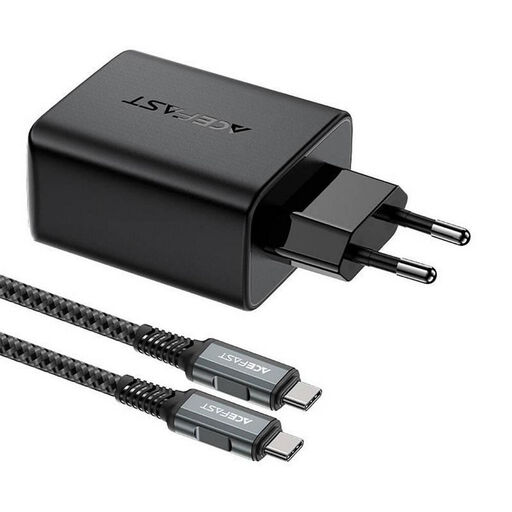
Why This Fits Their Persona: Ideal for users who are often on the move and travel light. This device combines a powerful GaN charger with an HDMI output. It replaces a separate laptop power brick and an HDMI adapter, keeping the desk at a hotel or client's office clutter-free.
It delivers a stable 4K at 60Hz for smooth presentations and provides 65W of power, enough to reliably charge most business laptops. The GaN technology ensures low heat generation.
Combines two devices in one: a charger and an HDMI adapter. Very compact and travel-friendly. Includes a matching USB-C cable.
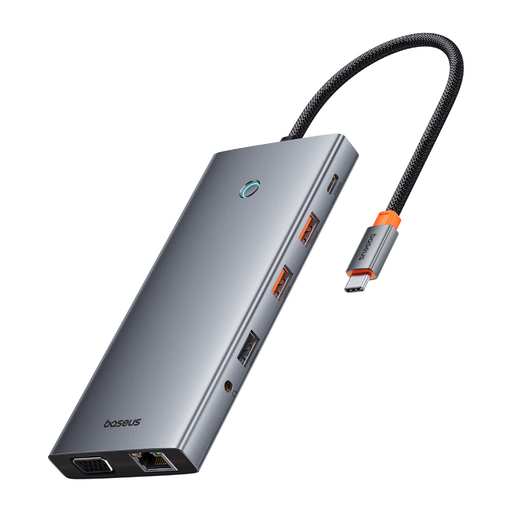
Why This Fits Their Persona: For anyone who wants to turn their laptop into a full-fledged workstation. This multiport adapter is a docking station for 2 monitors (and more), offering a huge variety of ports, including fast USB ports, Ethernet, and card readers. Perfect for a productive setup with a USB-C to HDMI for MacBook or Windows.
With 100W Power Delivery, it reliably charges even a high-end laptop. The two HDMI ports support 4K at 60Hz, and the aluminum housing ensures effective heat dissipation even under full load.
Supports up to four monitors (2x HDMI, 1x DP, 1x VGA). Offers fast USB 3.2 Gen 2 data transfer (10 Gb/s) and a robust aluminum housing.
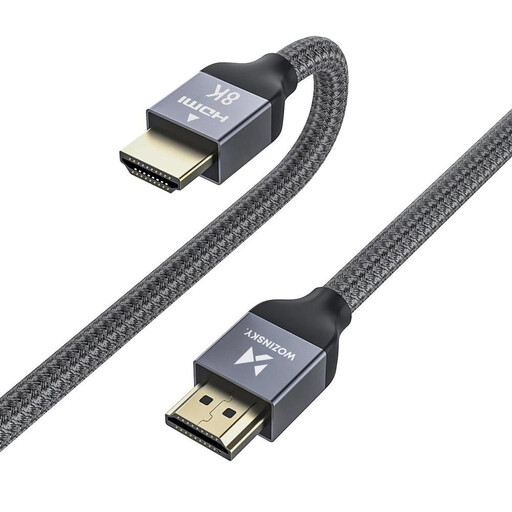
Why This Fits Their Persona: For users who prioritize pristine image and sound quality. This HDMI 2.1 8K cable is designed for connecting high-end devices like a PlayStation 5, Xbox Series X, or an 8K TV. A soundbar with HDMI eARC also benefits from the high bandwidth for lossless audio.
It bypasses the bottleneck of a low-quality cable. While a hub is the signal source, this cable ensures that the full 48 Gbps bandwidth reaches the display, which is essential for 4K at 120 Hz or 8K at 60 Hz.
Supports the full HDMI 2.1 standard, including Dynamic HDR, VRR, and eARC. The 5-meter length offers flexibility in device placement.
We have compiled a complete, up-to-date list of products that fully meet these strict selection criteria and safety regulations.
Not always. Simple adapters that only offer an HDMI port are powered directly by the laptop's USB-C port. However, more comprehensive hubs with multiple ports or a Power Delivery function require an external USB-C power adapter (often the one that came with your laptop) to supply enough energy for all ports and the charging function.
This can have several causes. Ensure that all components in the chain—your laptop, the HDMI cable, and the monitor—also support 4K at 60 Hz. An outdated HDMI cable (older than version 2.0) is a common culprit. Also, check your operating system and monitor settings, as the higher refresh rate may need to be enabled manually.
No. For video output over USB-C, the port must support what is known as DisplayPort Alternate Mode (DP Alt Mode). Most modern laptops (especially those with Thunderbolt 3 or 4) have this feature, but it may be missing on more budget-friendly devices or smartphones. A USB-C port designed only for data transfer and charging cannot output a video signal. Check your device's specifications or look for a lightning bolt (Thunderbolt) or DP symbol next to the port.