
Lieferung heute & morgen

Qualitätsgarantie

Willkommens-Angebote freischalten: KOSTENLOSE Lieferung | Bis zu 80 % RABATT | Kostenlose 30-Tage-JoyPlus-Testphase
App herunterladen
An Android tablet can combine streaming, browsing, learning, office tasks and gaming in a single device. However, model names and marketing claims vary considerably. Large RAM figures, high refresh rates or terms such as “5G Wi-Fi” alone say little about whether a device is suited to your everyday needs.
This buying guide from the Joybuy Product Recommendation Officer provides an objective overview of the most important specifications and explains which features matter when purchasing an Android tablet in Germany.
Specifications such as “20 GB RAM” may consist of, for example, 8 GB of physical RAM plus 12 GB of virtual RAM. The virtual portion uses part of the internal storage and is not technically equivalent to genuine working memory. For many apps and everyday multitasking, the physical RAM figure is the more meaningful specification.
For this reason, look for separate figures for:
Many listings use the terms “5G Wi-Fi” or “5G WLAN”. In most cases, this refers to the 5 GHz Wi-Fi frequency band, not a connection to a 5G mobile network. If you want to work on the move without a Wi-Fi router, you need a model with a 4G LTE or 5G mobile modem, SIM card support and compatible frequency bands.
A tablet with 4G and 5G Wi-Fi can therefore be particularly convenient if you want to switch between home Wi-Fi and mobile data. Even so, check before purchasing that the SIM card, tariff and network frequencies are compatible.
A tablet with a 120 Hz display can render scrolling and supported games more smoothly. Actual performance also depends on the processor, app and power consumption. A 90 Hz display may already be sufficient for streaming, documents and web browsing. Resolution is another important factor: on a tablet with a large display, low pixel density is more noticeable.
For emails, learning platforms and travel, displays between 10 and 11 inches are generally a well-balanced starting point. A 12- to 14-inch model offers more space for spreadsheets, split-screen windows and handwritten notes, but is less compact.
Check the following:
A large display is not automatically practical for every user. For commuters or children, a smaller device may be easier to hold and carry.
A mid-range processor is sufficient for video streaming, office apps and browsing. For a gaming tablet or demanding multitasking, you should also consider graphics performance, cooling and physical RAM.
128 GB of internal storage may be enough for apps and documents. If you store a large number of videos, photos or offline maps, choose a tablet with expandable storage. Bear in mind that not every application can be moved entirely to a memory card.
Capacity is measured in mAh, but this does not allow direct comparisons of battery life between devices with different display sizes and processors. A tablet with long battery life should combine high capacity with an efficient chipset and suitable power-saving options.
Also check:
Some models are supplied without a power adapter. Use a compatible, certified USB-C charger. Do not charge the device in damp conditions or if it is overheating unusually.
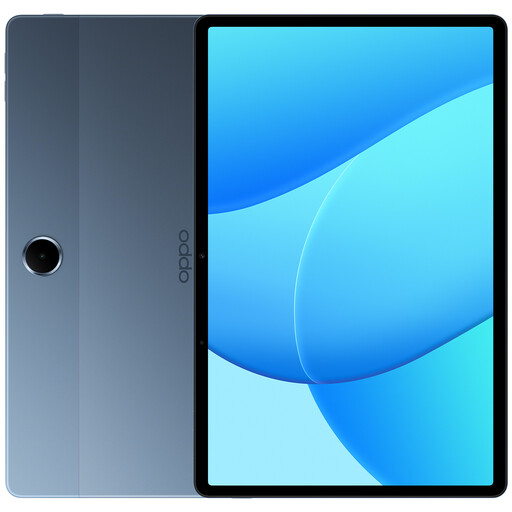
Why it suits this profile: This 11-inch model is aimed at users looking for an affordable tablet for streaming, web browsing and video calls.
The product specifications list 4 GB of RAM and 128 GB of storage separately. They also state that no charger is included.
11-inch LCD with 90 Hz, 128 GB of storage, Wi-Fi 6, a 9,340 mAh battery and Android 15.
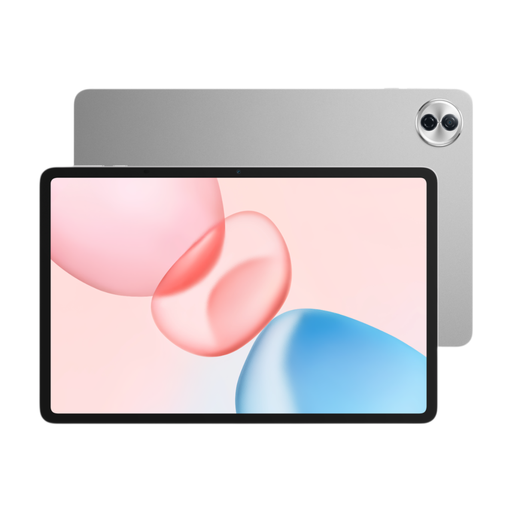
Why it suits this profile: For study, media and productive work, the large display provides more room than compact tablet models.
The 120 Hz specification is complemented by selectable 120, 90 and 60 Hz modes. This allows the refresh rate to be adjusted to usage and power requirements.
2,560 × 1,600 pixels, 120 Hz, Snapdragon 7 Gen 3, 10,100 mAh and Android 15 with MagicOS 9.0.
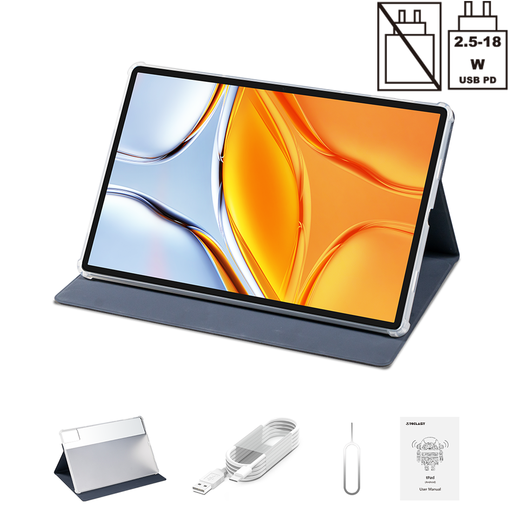
Why it suits this profile: The large 14-inch format is well suited to documents, video conferences and on-the-go content, provided you are comfortable with the greater weight.
The listing specifies dual-SIM 4G and 5G Wi-Fi separately. The RAM figure is shown as 8 GB plus 12 GB of virtual RAM.
14-inch display with 2.2K resolution, 128 GB of storage, a 10,000 mAh battery, GPS, Android 15 and a folio case.
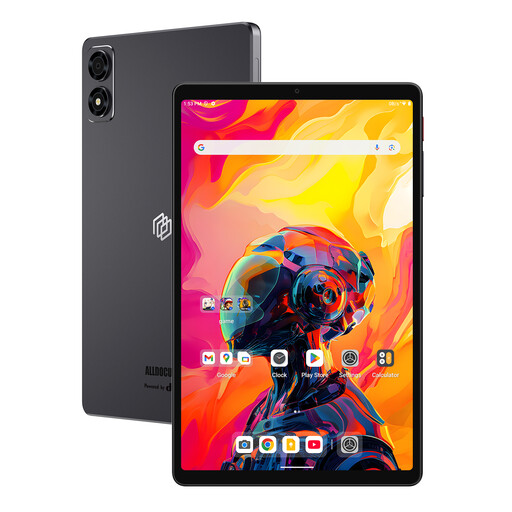
Why it suits this profile: The compact 8.8-inch format is easier to hold and combines a high refresh rate with a performance-focused processor.
The specifications clearly state Android 14, 12 GB of RAM and 256 GB of storage. A power adapter is not included.
8.8-inch display with 2.5K resolution and 144 Hz, Snapdragon 7+ Gen 3, a 7,300 mAh battery and USB 3.1 with DisplayPort output.
A tablet with keyboard can be a practical choice for longer texts and spreadsheets. Check whether the keyboard is included or needs to be purchased separately. A tablet with stylus should be assessed for compatibility, pressure sensitivity and charging method. The Teclast ArtPad Pro, for example, is specified as including a stylus with support for 4,096 pressure levels.
For a children’s tablet, a durable protective cover, a straightforward interface and parental supervision are more important. Small parts, cables and chargers should be kept out of reach of younger children. Time limits and suitable content filters should be configured through Android or app settings.
For a tablet for work and study, a display of at least 10 inches, sufficient physical RAM, USB-C and an optional keyboard are sensible essentials. If you regularly edit documents, also look for split-screen functionality, expandable storage and compatible stylus support.
Service life depends on the battery, software support, physical wear and app requirements. Before purchasing, check the manufacturer’s information on Android version upgrades and security updates. A protective case, careful charging and protection from moisture can extend the device’s practical lifespan.
Power consumption depends primarily on display brightness, refresh rate, processor and charging frequency. A device without a mobile modem does not incur additional data costs. A 4G or 5G model, however, requires a SIM card or data plan if you intend to use mobile data.