
Lieferung heute & morgen

Qualitätsgarantie

Willkommens-Angebote freischalten: KOSTENLOSE Lieferung | Bis zu 80 % RABATT | Kostenlose 30-Tage-JoyPlus-Testphase
App herunterladen
The search for a new tablet can quickly become overwhelming. The market is filled with devices promising impressive technical specs. However, not every specification delivers on its promise. Before you make a decision, it's crucial to understand the most common pitfalls that often lead to buyer's remorse.
Some manufacturers advertise huge amounts of RAM that, upon closer inspection, turn out to be a combination of a small amount of physical memory and a large amount of virtual memory. Other devices are marketed as a "Gaming Tablet" without having the necessary display or processor power to back it up. Another issue is supposed all-in-one packages, where accessories like a stylus or keyboard prove to be low-quality or are sold as separate extras. This guide will help you navigate these marketing traps and find a tablet that truly fits your needs.
To make an informed decision, it's essential to understand the key technical features and their real-world impact on daily use. Focus on the following three core areas.
A tablet's performance is primarily determined by its processor (CPU) and memory (RAM). Pay close attention to the details here:
The display is your primary interface with the device. Its quality significantly impacts the user experience.
The connection options and included accessories determine how flexibly you can use your tablet.
Based on the criteria mentioned, we have compiled a few models for different user groups.

Why This Fits Their Persona: This tablet is specifically designed for use by children. The rugged protective case shields it from drops, and the integrated Child Lock allows parents to easily control usage and content. It's a straightforward and safe entry-level device.
It avoids the pitfall of buying an expensive, fragile device for kids. The hardware is tailored for educational apps and simple games, and the protective case is already included, so there are no hidden additional costs.
Integrated parental controls and a rugged, child-friendly case. A very budget-friendly Android tablet for getting started.
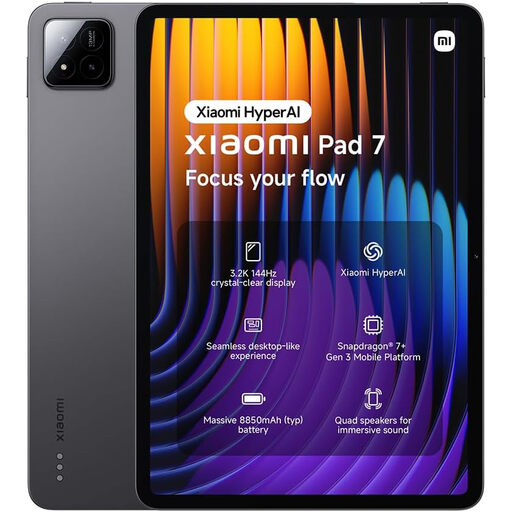
Why This Fits Their Persona: For students and professionals who need a lightweight device for notes, research, and Office applications. The Snapdragon 7+ Gen 3 processor and 144 Hz display enable fluid work, while the included keyboard transforms the device into a mobile workstation.
This bundle bypasses the accessory trap, as a high-quality keyboard is already part of the package. It offers a transparent, out-of-the-box solution without the need to hunt for expensive third-party accessories.
All-in-one package with a keyboard for a desktop-like experience. The 3.2K display with 144 Hz ensures an extremely smooth and sharp picture.
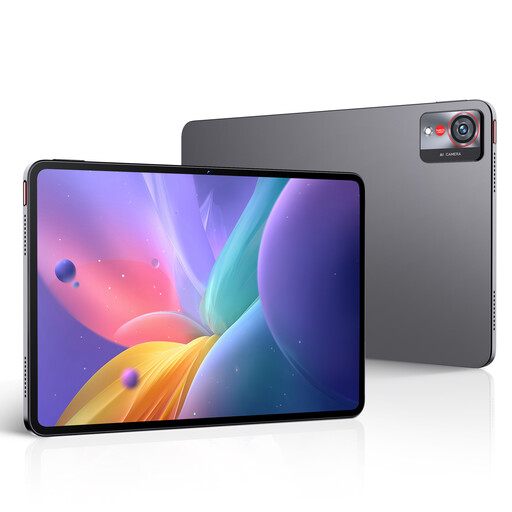
Why This Fits Their Persona: Engineered for users who demand maximum performance for demanding gaming and resource-intensive applications. The Snapdragon 8 Gen 3 processor, combined with 16 GB of RAM and a 144 Hz display, delivers uncompromising performance.
This tablet avoids the empty "gaming" promise. It delivers verifiable high-end specifications that live up to the claim, rather than just using the label for marketing. The combination of a flagship CPU and a 144 Hz display is built for true high-end gaming.
Equipped with the Snapdragon 8 Gen 3 flagship processor and an ultra-smooth 2.8K 144Hz display. The large 10,100 mAh battery with 66W fast charging ensures extended usage times.
We have compiled a complete, up-to-date list of products that fully meet these strict selection criteria and all relevant safety regulations.
What is the difference between physical and virtual RAM on a tablet? Physical RAM is a built-in, very fast memory chip that temporarily stores active apps and processes. Virtual RAM is an allocated portion of the slower, internal storage (ROM) that acts as an overflow buffer when the physical RAM is full. While virtual RAM helps keep more apps open simultaneously, it is significantly slower than physical RAM. Therefore, the amount of physical RAM is the more important indicator of multitasking performance.
Do I need a tablet with a SIM card? A tablet with a SIM card slot (4G LTE or 5G) is useful if you are frequently on the go and need a stable internet connection without relying on public Wi-Fi networks. For use purely at home or in the office, where a reliable Wi-Fi connection is available, a Wi-Fi-only model is usually sufficient and more cost-effective.
How long does an Android tablet's battery last on average? Battery life depends heavily on its capacity (measured in mAh) and your individual usage. A tablet with a battery capacity of 7,000 mAh to 10,000 mAh can typically last 8 to 12 hours with moderate use, such as web browsing or video playback. Intensive gaming or using the screen at maximum brightness can significantly reduce battery life. Pay attention to the mAh rating and look for features like Fast Charging to minimise downtime.