
Lieferung heute & morgen

Qualitätsgarantie

Willkommens-Angebote freischalten: KOSTENLOSE Lieferung | Bis zu 80 % RABATT | Kostenlose 30-Tage-JoyPlus-Testphase
App herunterladen
The Creality Hi Combo 3D printer is aimed at hobbyists, makers, model builders, designers, educational institutions and small businesses that want to produce FDM models at high speed or in multiple colours. On paper, 500 mm/s, automatic levelling and an expandable filament system sound impressive. However, choosing the right printer involves more than looking at a single headline figure.
The stated 500 mm/s refers to the maximum printing speed of the Creality Hi Combo. According to the manufacturer, the typical printing speed is around 300 mm/s. In practice, the result also depends on factors such as model geometry, filament, layer height, temperature and acceleration.
A fast printer will therefore not automatically save time with every model. With small or highly detailed components, acceleration paths, material changes and cooling times can reduce the advantage. Buyers should consider the maximum and typical speeds separately.
The Creality CFS filament system can select and change filaments automatically. According to the manufacturer, up to four CFS units can be connected, making a 16-colour 3D printer possible. However, each colour change will usually produce purge material, which needs to be taken into account in the print profile.
This function is practical for colourful figures, logos or design models. If you mainly print single-colour functional parts, check whether the additional material consumption and increased space requirements suit your workflow.
A 3D printer with automatic levelling can simplify print-bed calibration. However, uneven furniture, strong vibrations, residue on the build plate or incorrectly set temperatures cannot be fully compensated for.
The printer should be placed on a stable, heat-resistant surface. The build plate must be clean, and the filaments used should be stored in a dry place. These basics have a greater impact on the first layer than any single automatic feature.
According to the manufacturer, the Creality Hi Combo has a 260 × 260 × 300 mm build volume. This allows you to produce medium-sized models, enclosures, prototypes and several smaller parts in a single print run.
Before buying, check whether the build volume is suitable for the object you plan to create. Larger components require a bigger printer. At the same time, the machine itself, including cables, filament feed and maintenance space, needs more room than just its basic footprint of 483 × 379 × 390 mm.
The Creality Hi Combo is marketed as a CoreXZ 3D printer. This motion system uses coordinated X-/Z-axis guidance. Together with a stated acceleration of 12,000 mm/s², the printer is designed for fast movements.
The combination of speed and stability is important. According to the manufacturer, the metal body, X-axis precision rail and Y-axis guide rods help provide stable guidance. At high speeds, correct assembly, properly tensioned belts and regular maintenance remain essential.
According to the product specifications, this FDM 3D printer supports PLA, Hyper-PLA, ABS, PETG and PLA-CF, among other materials. The maximum nozzle temperature is 300 °C, while the heated bed reaches up to 100 °C. The standard nozzle has a diameter of 0.4 mm, and the stated layer height ranges from 0.12 to 0.28 mm.
These figures are not blanket approval for every filament. With abrasive materials such as carbon-fibre-reinforced variants, check whether the nozzle and the entire material path are suitable. ABS and similar materials also require suitable ventilation and a controlled environment.
According to the manufacturer, the Wi-Fi 3D printer can be controlled via USB or Wi-Fi. Features include a 3.2-inch touchscreen, a filament run-out sensor, power-loss recovery and an integrated camera with a privacy cover.
According to the product description, the CFS automatically detects the colour and type of Creality RFID filaments. With filaments that do not have matching RFID information, manual input or a check of the material settings may be necessary.
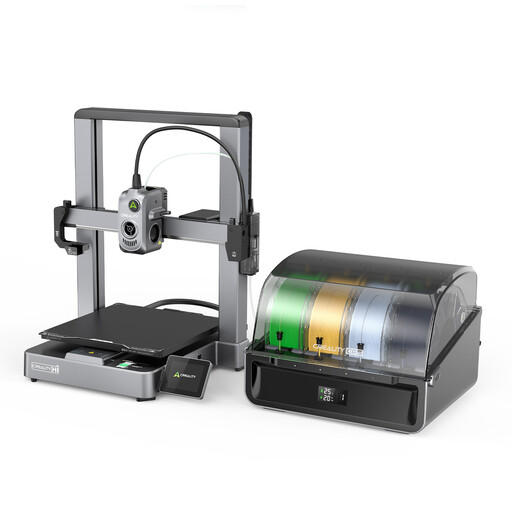
Why this product suits this profile: This printer combines automatic levelling, Wi-Fi, a medium-sized build volume and expandable multi-colour printing in one machine. Its pre-assembled design can make getting started easier.
Separating the maximum speed of 500 mm/s from the typical speed of 300 mm/s creates more realistic expectations. Automatic levelling reduces manual adjustments, but does not replace a stable setup.
260 × 260 × 300 mm build volume and CFS support for up to 16 colours when expanded.
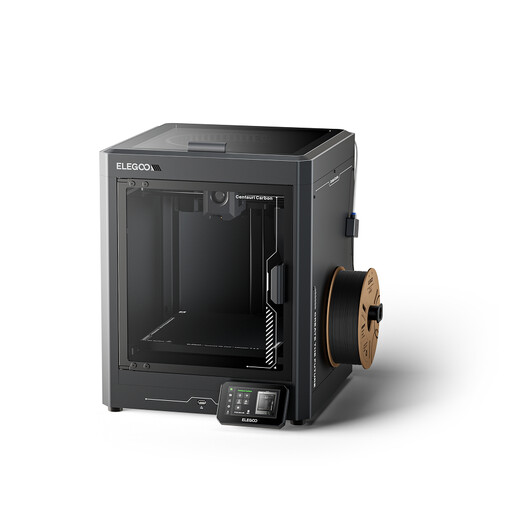
Why this product suits this profile: For users looking for an enclosed design, automatic calibration and support for technical filaments, this CoreXY model offers an alternative set of features.
Alongside 500 mm/s, the specifications state the build volume, nozzle temperature and filament compatibility. This makes it easier to check whether the machine is suitable for your chosen materials.
Enclosed construction, a maximum nozzle temperature of 320 °C and an integrated camera according to the product specifications.
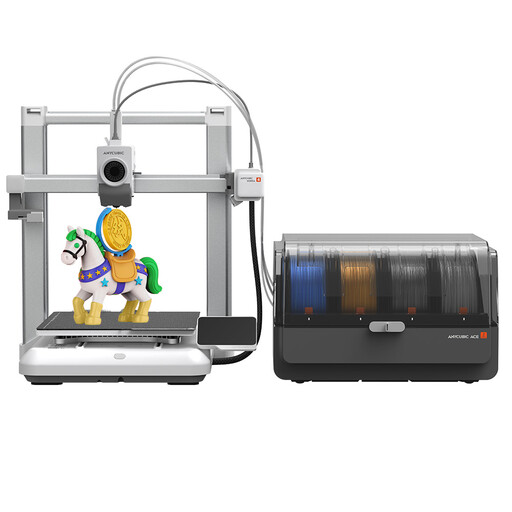
Why this product suits this profile: The Combo version is designed for users who need standard four-colour printing and are considering an upgrade to up to eight colours.
The specifications for standard colours, expandability, a recommended speed of 300 mm/s and a maximum of 600 mm/s help distinguish marketing figures from your intended use case.
260 × 260 × 260 mm build volume and automatic 49-point levelling according to the product description.
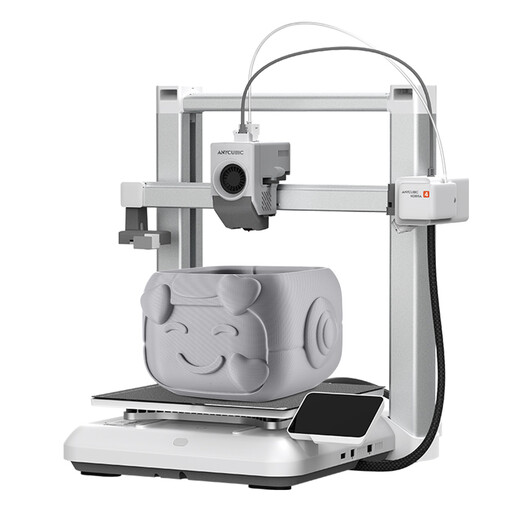
Why this product suits this profile: If you mainly create single-colour models and prototypes, you can do without a multi-colour system while still enjoying Wi-Fi, automatic calibration and high printing speeds.
Skipping a Combo system can avoid purge material and additional components when colour changes are not required.
Recommended printing speed of 300 mm/s, maximum nozzle temperature of 300 °C and dual-band Wi-Fi according to the product specifications.
We have put together a complete, regularly updated list of products that fully meet these strict selection criteria and the safety regulations applicable in the EU.
A stable surface is particularly important for a 3D printer with 500 mm/s. A suitable printer table should safely support the weight of the machine and wobble as little as possible. Castors can be convenient, but should be locked during printing. Filament spools and accessories also require dry storage space.
Ongoing costs include filament, electricity, wear parts and, where applicable, purge material when printing in multiple colours. A heated build plate and long print times increase energy consumption. Before buying, it is therefore worth making a simple calculation based on your planned print volume and material prices.
For safe operation, follow the manufacturer’s instructions: the printer should be placed on a stable, heat-resistant surface in a well-ventilated area. Do not touch the nozzle or heated bed during operation. Children should only use the machine under supervision.
According to the manufacturer, the supplied or compatible Creality CFS filament system can be expanded. With up to four CFS units, up to 16 colours are supported. Actual material consumption depends on colour changes and the settings in the slicer.
The construction is stated to be approximately 95 per cent pre-assembled. Automatic bed levelling, a touchscreen, filament detection and Wi-Fi can make getting started easier. Basic knowledge of filament temperature, print-bed care and slicer settings is still required.
According to the product specifications, the machine supports PLA, Hyper-PLA, ABS, PETG and PLA-CF, among other materials. The recommended temperature ranges, filament storage and adequate ventilation are all important. Always follow the filament manufacturer’s instructions for each material.