
Lieferung heute & morgen

Qualitätsgarantie

Willkommens-Angebote freischalten: KOSTENLOSE Lieferung | Bis zu 80 % RABATT | Kostenlose 30-Tage-JoyPlus-Testphase
App herunterladen
By Joybuy Product Recommendation Officer, August 28, 2026
The number of devices per person is constantly growing—laptop, smartphone, tablet, headphones. Each comes with its own power adapter and cable, which quickly leads to a tangled mess at the power strip. A multi-port USB-C charger promises a solution: one central charging station for all your devices. But the selection process is fraught with pitfalls that can quickly turn a practical solution into an expensive mistake.
Many users invest in a supposedly powerful charger, only to find that the charging speed plummets as soon as more than one device is connected. Others opt for budget-friendly models that get dangerously hot or fail after just a few months. This guide will show you what to look for to find a safe and efficient charging solution that truly simplifies your daily life.
Before we dive into the important technical details, let's highlight the three most common problems that arise when choosing a charger for multiple devices:
To avoid the pitfalls mentioned above, you should carefully examine three technical aspects. These determine whether a USB-C power adapter is suitable for your needs.
The total output, specified in watts (W), is the maximum power the charger can deliver across all its ports. However, the crucial factor is how this power is distributed. This is where the Power Delivery (PD) standard comes into play. A Power Delivery charger can communicate with the connected device to negotiate the optimal charging voltage and current.
Charging a modern laptop via USB-C often requires 65W or more. A 100W USB-C charger is therefore a good choice if it can also provide this power through a single port. Look for specifications in the product details like "USB-C1: up to 100W." This is the only way to ensure that your laptop charges at full speed even when your smartphone is connected at the same time.
When you see the term GaN charger, it stands for Gallium Nitride. This semiconductor material is increasingly replacing traditional silicon in modern power adapters. The advantages are significant:
A GaN charger is therefore a worthwhile investment, especially if you are looking for a powerful model for travel or a tidy desk.
Consider which devices you primarily want to charge. A modern setup benefits from multiple USB-C ports, as this is the common standard for laptops, tablets, and many smartphones. However, a few USB-A ports are still useful for older devices, smartwatches, or headphones. A 4-port USB charger often offers a good balance.
There are also different form factors:
Here are some recommendations tailored to different use cases that meet the criteria mentioned above.
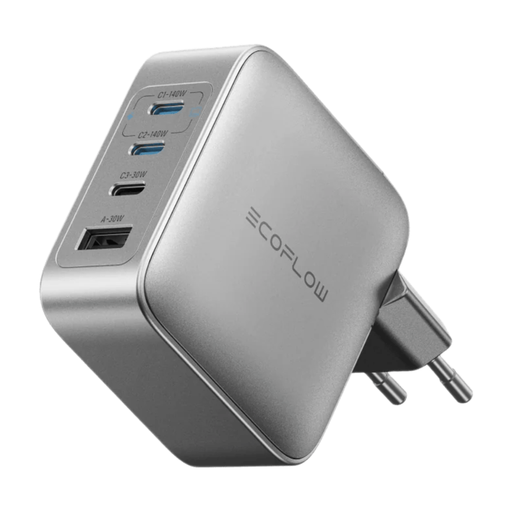
Why This Fits Their Persona: Ideal for users who need to charge a powerful laptop and other devices on the go or in the office without compromise. The high power output and compact GaN design make it a perfect companion for any laptop bag.
This charger bypasses the power trap by delivering up to 140W through a single USB-C port, enough for the most demanding laptops. GaN technology and advanced temperature control also prevent overheating.
Very high 140W charging power for laptops and intelligent power distribution across four ports. Compact design thanks to GaN technology.
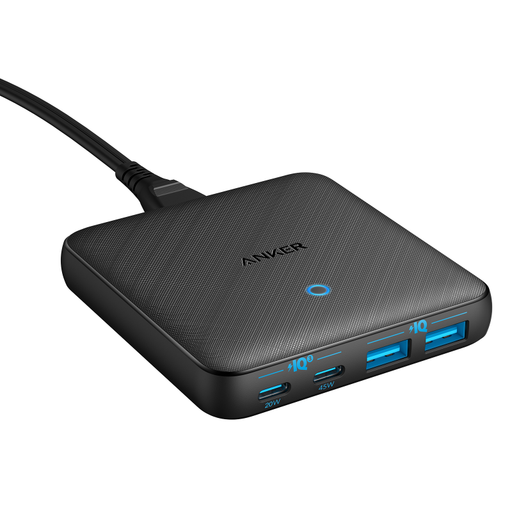
Why This Fits Their Persona: Perfect for families or the home office. As a desktop charger with a long power cord, it keeps things tidy by placing the ports directly on the desk and leaving the wall socket free. The four ports can power all common devices.
Anker's PowerIQ 3.0 technology ensures intelligent and dynamic distribution of the 65W output, rather than just rigidly splitting the power. The slim GaN design prevents excessive heat buildup on the desk.
Slim desktop design for an uncluttered workspace. Flexible placement thanks to a 1.5m power cord and 4 ports for your entire device fleet.
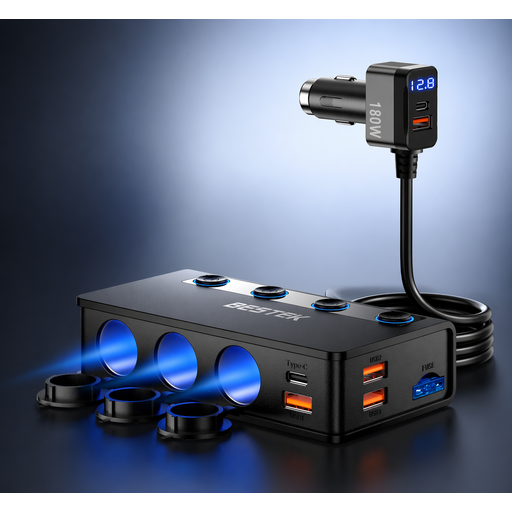
Why This Fits Their Persona: This car charger transforms a single cigarette lighter socket into a full-fledged charging station. With 6 USB ports and 3 additional lighter sockets, all of the family's devices can be charged simultaneously on long trips—from smartphones to a portable cooler.
It offers dedicated PD and QC3.0 ports with clearly defined power outputs, including a 65W PD port for laptops. Integrated safety features and separate switches for the lighter sockets protect the vehicle's electronics from overload.
Massive port variety with a total of 9 charging spots and a high total output of 180W. The voltage display helps you keep an eye on the car battery's condition.
We've compiled a complete, up-to-date list of products that fully meet these strict selection criteria and UK safety regulations.
Power Delivery (PD) is a universal charging standard that works over USB-C and supports high power levels (up to 240W) for a wide range of devices, including laptops. Quick Charge (QC) is a technology developed by Qualcomm, primarily found in Android smartphones with Snapdragon processors. Many modern multi-port chargers support both standards to ensure maximum compatibility.
No, a high-quality fast charger with modern safety standards poses no threat. Technologies like Power Delivery ensure that the charger only supplies as much power as the connected device can safely handle. Integrated protection circuits against overcharging, overvoltage, and overheating provide additional safety.
Yes, the cables play a crucial role. To take advantage of the full speed, especially for power levels above 60W, you need an appropriately certified USB-C cable. For power levels of 100W or more, cables with an integrated E-Marker chip are required. Using an unsuitable cable will slow down the charging process and, in the worst case, can cause the cable to overheat.