
Lieferung heute & morgen

Qualitätsgarantie

Willkommens-Angebote freischalten: KOSTENLOSE Lieferung | Bis zu 80 % RABATT | Kostenlose 30-Tage-JoyPlus-Testphase
App herunterladen
A compact black-and-white printer should reliably print invoices, forms and work documents for your home office. At the same time, many buyers expect scanning, copying, Wi-Fi and mobile printing in one device. The PANTUM BM2300AW multifunction printer meets several of these requirements, but its technical specifications should be read carefully before purchase.
When choosing a black-and-white A4 laser printer, certain mistakes are particularly common:
The PANTUM BM2300AW uses mono laser printing and, according to the product specifications, achieves up to 22 pages per minute, or 22 ppm, for standard A4 printing. This is suitable for regular document printing at home, in a home office or in a small business.
The recommended print volume is more important than a maximum monthly figure. For this model, 250 to 2,000 pages per month is recommended. The stated maximum duty cycle of 10,000 pages per month is not a target for continuous operation, but a technical limit under defined conditions. If you regularly print significantly more, consider a business model designed for higher volumes.
A printer with duplex printing can help save paper when both sides of a document are used. However, the BM2300AW’s technical specifications indicate manual duplex printing. This means the pages may need to be reinserted or turned over, depending on the print job. Although printing, copying and scanning are listed as duplex functions, this should not automatically be taken to mean that the device has a fully automatic document-turning mechanism.
If you frequently process multi-page contracts or scripts double-sided, check before buying whether the specific task will genuinely be carried out automatically on both sides. This distinction helps prevent a common disappointment after delivery.
The BM2300AW combines printing, scanning and copying. According to the manufacturer’s specifications, the integrated flatbed scanner offers an optical resolution of 1,200 × 1,200 dpi and handles originals up to 216 × 297 mm. A flatbed scanner is practical for letters, identity cards and individual A4 pages.
An ADF is mentioned in the product name. However, the technical specifications list a flatbed scanner without providing detailed information about feeder capacity. Buyers who want to copy or scan many pages at once should therefore check the exact package contents and configuration before purchasing.
The paper tray holds up to 150 sheets. Supported sizes include A4, A5 and A6, as well as B5, B6, envelopes, labels and paper weighing 60 to 163 g/m². This range is sufficient for everyday business documents; specialist media should be used according to their suitability.
As a multifunction printer with Wi-Fi, the BM2300AW can be connected wirelessly to a suitable network. It also supports USB 2.0, Bluetooth, Wi-Fi Direct, AirPrint, Mopria and the Pantum App.
Check the operating system and version before buying. The BM2300AW is listed as supporting Windows 7, 8.1, 10 and 11, macOS Ventura, selected Ubuntu versions, Android and iOS. There is no Ethernet LAN connection. This may be relevant for offices with a fixed wired network.
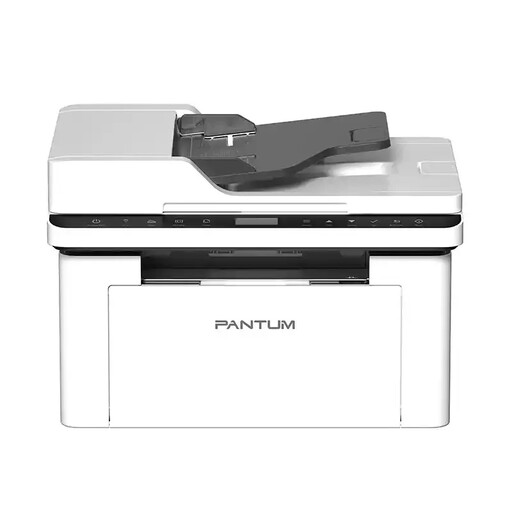
Why this product suits the profile: This multifunction device is aimed at households and home office users who need to print, scan and copy, while also wanting to work wirelessly from a smartphone or computer.
The specifications clearly state 22 ppm, a paper capacity of 150 sheets and support for mobile standards. Duplex printing should be treated as manual.
22 ppm, 1,200 × 1,200 dpi optical scan resolution, plus AirPrint, Mopria, Bluetooth and Wi-Fi Direct.
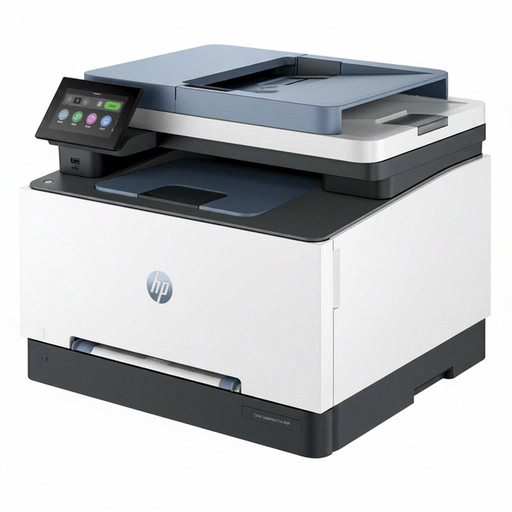
Why this product suits the profile: If you need colour prints as well as documents, this multifunction device offers colour laser printing, a touchscreen and several connection options.
The specifications explicitly state automatic double-sided printing as well as Wi-Fi, Ethernet and USB. This makes it easier to assess the available connection options in advance.
Up to 25 pages per minute according to the product specifications, colour printing, a 350-sheet input capacity and an integrated scanner/copier.
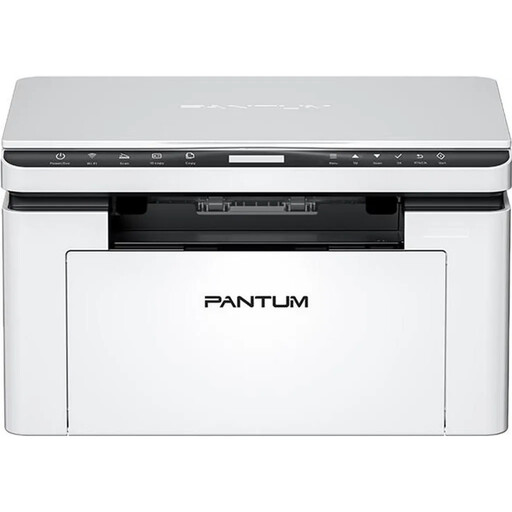
Why this product suits the profile: This version is appealing to users who want not only Wi-Fi but also 2.4 and 5 GHz networks, Bluetooth and a control panel with an LCD display.
The networking features are specified in greater detail. Here too, duplex printing is manual and should not be confused with an automatic feeder.
Print speed of 22 ppm, 23 copies per minute, 256 MB of memory and an 800 MHz processor.
We have put together a complete, regularly updated list of products that fully meet these strict selection criteria and the safety regulations applicable in the EU.
The technical product specifications indicate manual duplex printing. The device can support double-sided printing, copying and scanning tasks, but the paper pages may need to be turned over or reinserted by hand. Check the specific product description before buying.
Yes. According to the product specifications, the printer supports AirPrint, Mopria, Wi-Fi Direct, Bluetooth and the Pantum App. For smooth installation, the mobile device, operating system version and Wi-Fi network must be compatible.
In addition to the purchase price, the main costs are for toner and, where applicable, replacement parts. A black-and-white laser printer only requires one black toner cartridge. For a realistic comparison, buyers should consider the stated toner yield, the price of the compatible cartridge and their personal monthly print volume. The BM2300AW’s recommended range is 250 to 2,000 pages per month.