
Lieferung heute & morgen

Qualitätsgarantie

Willkommens-Angebote freischalten: KOSTENLOSE Lieferung | Bis zu 80 % RABATT | Kostenlose 30-Tage-JoyPlus-Testphase
App herunterladen
A TV wall mount not only creates space and lends a clean aesthetic to your living room, but it can also enhance your viewing experience. However, the path to the perfect installation is paved with pitfalls. Many buyers rely on misleading marketing claims or overlook crucial technical details, leading to incompatibility, safety hazards, or simply an unsatisfactory result. As your Joybuy Product Recommendation Officer, I'm here to help you navigate these mistakes and make an informed decision.
Before we dive into the technical details, let's look at the three most common problems that arise when choosing a TV mount.
To avoid making the wrong choice, you should check the following three points before buying a TV wall mount.
The most important factor for compatibility is the VESA standard. This standardises the distance between the threaded mounting holes on the back of your TV. You can find the VESA specification (e.g., VESA 400x400 mount) in your TV's manual or measure the distance yourself (horizontal x vertical in millimetres). Compare this value with the supported VESA patterns of the wall mount.
Weight is equally critical. Weigh your TV or find its weight in the product's data sheet. For safety, the wall mount's maximum load capacity must always be greater than the actual weight of the TV.
The right choice depends on your room and your viewing habits.
Check which wall types the mount is approved for. Solid concrete or brick walls are generally straightforward. For stud walls (e.g., with drywall), the mount must be securely screwed into the wooden studs behind the plasterboard. Special anchors and mounting systems are available for hollow walls, but they do not increase the wall's overall load-bearing capacity. When in doubt, have a professional assess the suitability of your wall.
Here are some recommendations tailored to different user profiles and requirements.
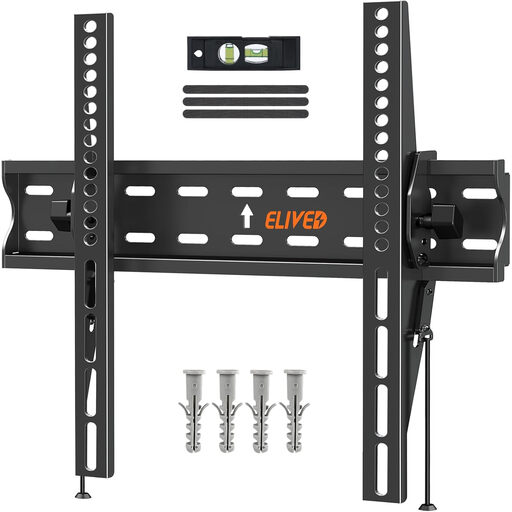
Why This Fits Their Persona: Ideal for users who want a minimalist aesthetic. The TV hangs like a picture on the wall, creating an extremely clean and modern look without sacrificing a basic anti-glare feature.
It solves the problem of choosing the wrong mount type. It offers an ultra-slim look, but its tool-free tilt function of up to 8° allows you to counteract glare—a compromise that fixed mounts don't offer.
Ultra-Low Profile: With only 38 mm of clearance from the wall, it achieves a particularly discreet installation. Broad Compatibility: Supports VESA patterns from 75x75 mm to 400x400 mm and a load capacity of up to 45 kg.
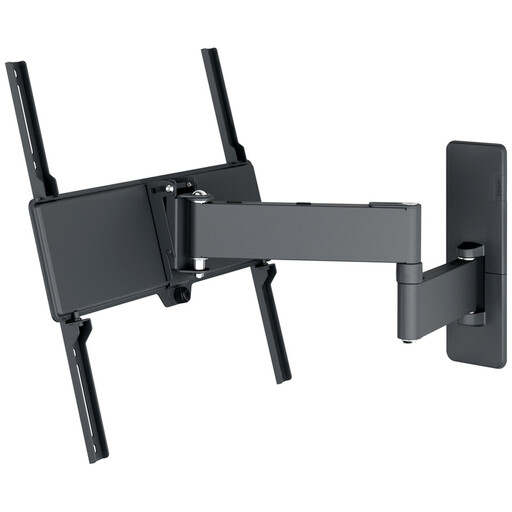
Why This Fits Their Persona: Perfect for households with open-plan layouts or variable seating arrangements. Anyone who wants to watch TV from the sofa, dining table, or kitchen needs maximum freedom of movement, which this model provides with its wide swivel and tilt range.
This is the antithesis of buying an unsuitable fixed model. Its up to 180° swivel range and tilt function ensure the viewing angle is optimal from almost any position in the room, making glare a non-issue.
One-Finger Movement: According to the manufacturer, the design allows for exceptionally smooth and gentle movement of the TV with just a fingertip. Integrated Cable Management: Neatly guides cables along the arm for a tidy appearance.
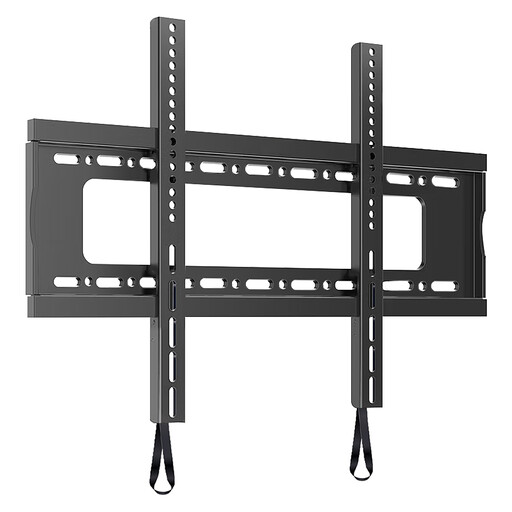
Why This Fits Their Persona: For home cinema enthusiasts with large and heavy TVs (up to 90 inches), safety is the top priority. A fixed mount with a high load capacity offers maximum stability and reliability for valuable large-screen displays.
It directly addresses the mistake of choosing a mount with insufficient weight capacity. With a load capacity of up to 100 kg and support for VESA patterns up to 600x600 mm, it is explicitly designed for the largest and heaviest consumer TVs.
Extremely High Load Capacity: Engineered to securely hold up to 100 kg, which is more than enough for most large-screen TVs. Robust Construction: The fixed design without moving joints maximises stability and safety.
We have compiled a complete, up-to-date list of products that fully meet these strict selection criteria and safety standards.
1. Can I install a TV wall mount on a drywall wall? Mounting directly into the drywall panel is not recommended, as it cannot safely support the weight of the TV and mount. The installation must be secured into the wood or metal studs behind the wall. Use a stud finder to locate their position. Alternatively, special high-load hollow-wall anchors can be used, but the maximum load capacity of the wall itself must always be considered. Always follow the mount's installation instructions carefully.
2. What does the VESA standard mean for a TV mount? The VESA standard is an international specification that defines the distance between the four mounting holes on the back of a TV in millimetres. A specification like "VESA 400x400" means the holes form a 400 mm by 400 mm square. This standard ensures that mounts and TVs from different manufacturers are compatible as long as their VESA patterns match.
3. How high should I mount my TV on the wall? A common recommendation is that the centre of the screen should be at eye level when you are seated on your couch or chair. Measure your seated eye level and position the mount accordingly. With tilting mounts, the TV can also be mounted slightly higher, for example, above a fireplace, as the screen can be tilted down for optimal viewing.