
Lieferung heute & morgen

Qualitätsgarantie

Willkommens-Angebote freischalten: KOSTENLOSE Lieferung | Bis zu 80 % RABATT | Kostenlose 30-Tage-JoyPlus-Testphase
App herunterladen
Modern laptops like the MacBook Pro or slim Windows notebooks embrace minimalism—often at the expense of port variety. A single USB-C port for power, data, and video has become the norm. A 10-in-1 USB-C Hub promises to solve this problem, but the market is flooded with products featuring misleading claims that lead to frustration and wasted money.
As your Joybuy Product Recommendation Officer, I'm here to help you cut through the noise. We'll break down the crucial technical details so you can make an informed decision and find a solution that truly streamlines your workflow.
Many users invest in a supposed all-in-one solution, only to find it fails in daily use. Watch out for these three common marketing traps:
To make the right choice, focus on the technical specs that are relevant to your specific needs.
The ability to connect one or more monitors is often the main reason for buying a USB-C docking station.
A capable hub must not only connect peripherals but also reliably power your notebook and move data quickly.
Instead of making a one-size-fits-all recommendation, we've identified products that fit specific user profiles.

Why it's a match: This model is designed for users who refuse to compromise. It handles the most demanding video editing and gaming workflows where high resolution and smooth frame rates are critical.
The hub offers an explicit HDMI port with 4K@120Hz, far surpassing the choppy 30 Hz standard. It also features two 10 Gbps data ports (USB-A and USB-C) for rapid transfers.
The combination of 100W PD, two HDMI ports for multi-monitor setups (MST-capable), and 10 Gbps data transfer makes this Baseus docking station a future-proof hub for any desk.
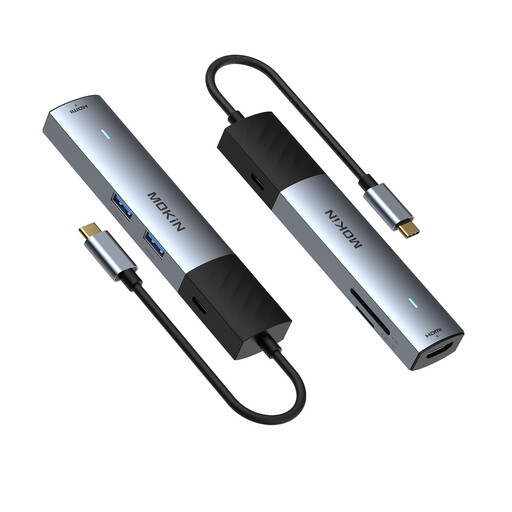
Why it's a match: Ideal for the classic office or home office setup. This hub provides all the necessary ports for an external monitor, standard peripherals, and fast charging, without superfluous features.
This model delivers a stable 4K at 60 Hz, which is perfectly smooth for office applications. The 100W Power Delivery ensures that even powerful laptops are charged reliably, avoiding the insufficient power trap.
A balanced price-to-performance ratio. The hub focuses on the most-used features: HDMI 4K@60Hz, USB 3.0 (5 Gbps) for common data transfers, and an SD/TF card reader in a compact package.
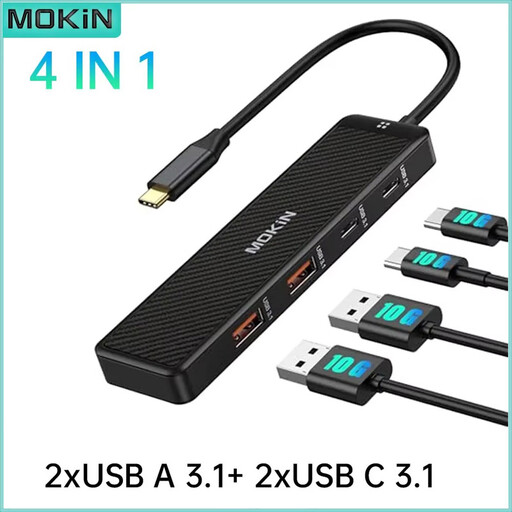
Why it's a match: For users whose priority is rapidly exchanging large amounts of data with external SSDs or hard drives. This hub forgoes video outputs to focus entirely on maximum data speed.
This hub decisively avoids the mixed-speed trap: all four ports (2x USB-A, 2x USB-C) support the USB 3.1 standard at 10 Gbps. You get consistently high speed without worrying about a bottleneck.
Maximum data transfer rate on all ports. Support for UASP mode (USB Attached SCSI Protocol) further optimises performance with compatible SSDs, delivering even faster read and write speeds.
We've compiled a comprehensive, up-to-date list of products that meet these strict selection criteria and comply with current regulations.
That depends on your MacBook model. Windows PCs typically support MST (Multi-Stream Transport), which allows for displaying different images on two monitors via one hub. MacBooks with standard M1/M2/M3 chips natively support only one external display. To bypass this limitation, you need a special docking station with DisplayLink technology, which acts as an external graphics card. MacBook Pro/Max models, on the other hand, do support multiple external monitors.
Use your laptop's original power adapter rating as a guide. For a 13-inch ultrabook, 65 watts is usually sufficient. For a 15- or 16-inch performance notebook (e.g., MacBook Pro, Dell XPS 15), you should choose a hub that passes at least 85 watts to the device. This means the hub itself should be powered by a 100-watt adapter.
A well-designed hub shouldn't interfere with your Wi-Fi connection. However, poorly shielded models can cause radio frequency interference. The most reliable solution is to use a USB-C hub with a LAN port. A wired Gigabit Ethernet connection is typically faster and more stable than any Wi-Fi connection and is not affected by potential interference from the hub.