
Same-day & Next-day Delivery

Quality Guaranteed

Unlock Your Welcome Offers: FREE Delivery | Up to 80% OFF | Free 30-day JoyPlus trial
Download the APP
The search for a large, immersive screen for movies and gaming often leads to a compromise: a big-screen TV isn't portable, and a laptop display can feel restrictive on the move. For anyone who wants a private cinema experience or a large gaming screen that fits in a backpack, so-called AR glasses offer a compelling solution.
These devices, also known as video glasses or smart glasses, project a large virtual image directly in front of your eyes, acting as a portable monitor. But the market is growing, and the technical specifications can be confusing. This guide is designed to help you understand the key features and make an informed choice for your needs.
To find the right AR glasses, it's helpful to focus on a few key features that significantly impact the user experience.
The heart of any pair of video glasses is the display. Modern models use Micro-OLED technology, known for its deep blacks and high contrast. Pay attention to the resolution (usually Full HD per eye) and the refresh rate. A frequency of 120 Hz is especially important for smooth visuals in fast-paced games.
The Field of View (FOV), measured in degrees, determines how large the virtual screen is perceived. A wider FOV of around 50° creates a more immersive feeling, comparable to viewing a large cinema screen from a few meters away. Brightness, measured in nits, is also crucial for ensuring a clear picture even in brighter environments.
AR glasses are only as useful as the devices they can connect to. Most models use a USB-C port with DisplayPort support to transmit video, audio, and power. Before buying, it's essential to check if your smartphone, laptop, or gaming console supports this standard.
For gamers, console compatibility is crucial. An AR glasses for PS5 or Xbox Series X/S often requires an additional HDMI-to-USB-C adapter. Models that are directly compatible with the Steam Deck or Nintendo Switch offer a seamless plug-and-play experience for mobile gaming.
Since AR glasses are worn for extended periods, weight and ergonomics are critical. Lightweight models around 75 grams with balanced weight distribution and adjustable nose pads offer the best comfort.
For glasses wearers, smart glasses with diopter adjustment are a particularly convenient feature. Some glasses allow for stepless vision correction directly on the device, eliminating the need to wear prescription glasses underneath. This is a significant advantage for users with nearsightedness.
Based on the criteria above, we've selected a few models that present a compelling solution for various use cases.
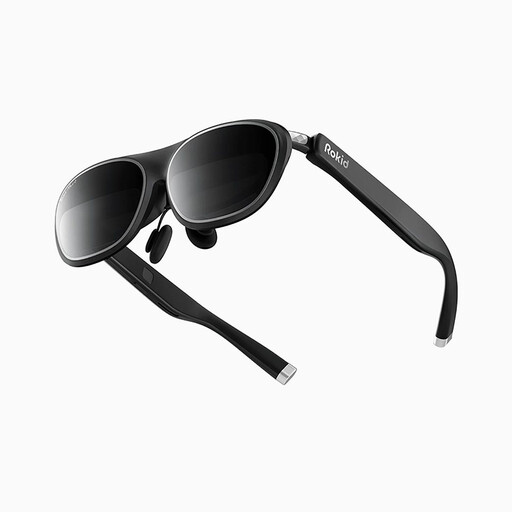
Why It Stands Out: The Rokid Max 2 combines high image quality with outstanding user comfort, especially for glasses wearers. The integrated diopter adjustment makes it a hassle-free choice for nearsighted users.
Pros:
Who Is It For? Ideal for movie lovers and gamers looking for high-performance gaming glasses who prefer a hassle-free solution without needing extra eyewear due to nearsightedness. Its broad compatibility makes it a versatile companion for PCs, consoles, and Android devices.
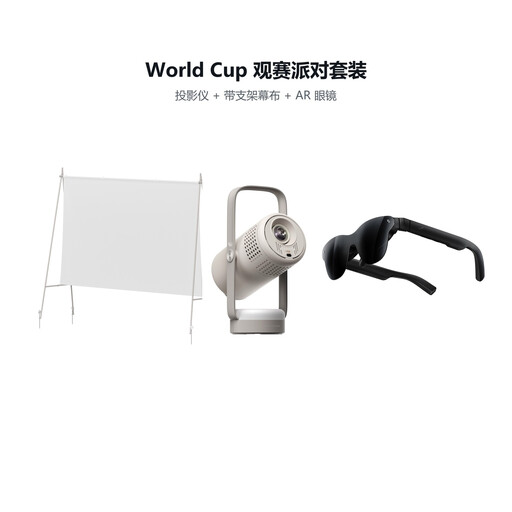
Why It Stands Out: This bundle is more than just AR glasses—it's a complete entertainment package. It offers the flexibility to enjoy content privately on the AR glasses or together with friends via the projector.
Pros:
Who Is It For? For users seeking maximum flexibility. Perfect for anyone who wants both a private big-screen experience for themselves and a solution for movie nights or viewing parties with friends and family.
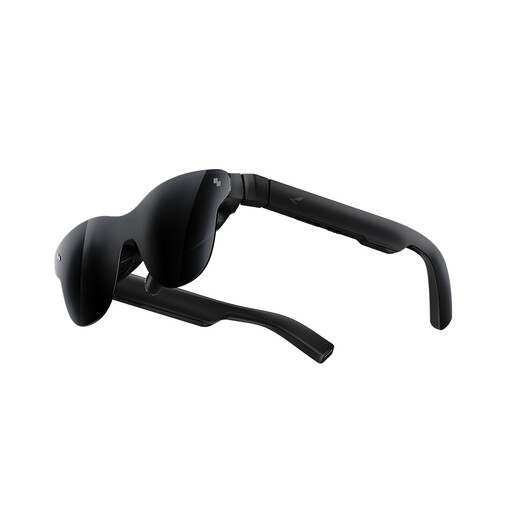
Why It Stands Out: The RayNeo Air 4 Pro focuses on excellent visual performance with HDR support and intelligent image enhancement features. It's a strong choice for anyone who values color accuracy and a cinematic 3D experience.
Pros:
Who Is It For? These AR glasses for movies are aimed at cinephiles and tech enthusiasts who demand the highest image quality. Its broad compatibility, including iPhone, Switch 2, and PS4/5, makes it a versatile entertainment device.
The models featured here offer a good overview of what's currently possible with AR glasses. However, the market is constantly evolving, offering a growing variety of devices for different budgets and needs.
If you want to compare more models or learn about compatible accessories, you can find a wider selection in our electronic gaming devices category.
1. What's the difference between AR and VR glasses? AR (Augmented Reality) glasses overlay digital information onto your real-world view, allowing you to still see your surroundings. The video glasses discussed here are a form of AR that primarily functions as an external display. VR (Virtual Reality) glasses, on the other hand, completely replace your environment with a computer-generated world, blocking out the outside world.
2. Can AR glasses replace a TV or monitor? For certain use cases, yes. As a private, portable big screen for movies or gaming, AR glasses are an excellent alternative. They offer an immersive experience in a compact form factor. For productivity tasks that require constant interaction with a physical keyboard and mouse, some users may still prefer a traditional monitor.
3. Do AR glasses work for people who wear glasses? It depends on the model. Some glasses, like the Rokid Max 2, offer built-in diopter adjustment for nearsightedness, so no additional eyewear is needed. For other models or different vision corrections (e.g., astigmatism), you'll need to check if special prescription lens inserts are available from the manufacturer or third-party suppliers.