
Lieferung heute & morgen

Qualitätsgarantie

Willkommens-Angebote freischalten: KOSTENLOSE Lieferung | Bis zu 80 % RABATT | Kostenlose 30-Tage-JoyPlus-Testphase
App herunterladen
Choosing the right XR glasses can be overwhelming. The market is filled with technical jargon and marketing promises that often obscure more than they clarify. Many users invest in a device only to find it's unsuitable for their needs—whether due to blurry text, a lack of compatibility, or an uncomfortable fit. This guide will help you identify the crucial features and make an informed decision.
Before we dive into the technical details, it's important to understand the most common issues that lead to dissatisfaction.
To avoid the pitfalls mentioned above, you should focus on three core technical aspects. These are the primary determinants of an XR headset's quality and usability.
The perceived sharpness depends on the PPD (Pixels Per Degree). A value over 45 PPD is considered good for reading text, while values above 55 PPD offer excellent clarity. Also, pay attention to the display technology. Modern Micro-OLED panels, like those developed by Sony, provide high brightness, excellent contrast, and more efficient power consumption, which helps preserve the battery life of connected devices.
Motion tracking is a central element of the XR experience. There are two main standards:
A future-proof pair of XR glasses should feature a standardized connection, ideally USB-C with DisplayPort Alt Mode. This ensures compatibility with a wide range of devices, from smartphones and laptops to gaming consoles. Check carefully which devices are natively supported. Adapters are often necessary to connect to older devices or to expand functionality. A good selection of adapters ensures you can use your glasses flexibly.
Instead of making a one-size-fits-all recommendation, we have selected products that meet specific user needs and take the previously mentioned criteria into account.
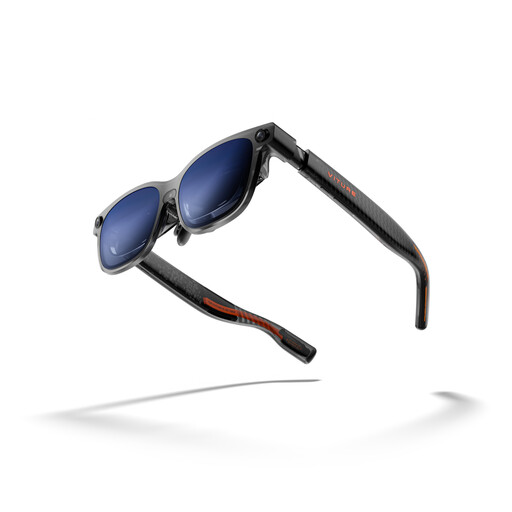
Why This Fits Their Persona: This model is designed for users who don't want to compromise. It serves as a full-fledged replacement for a physical monitor, an immersive gaming platform, and a private cinema—all in a lightweight form factor.
According to the manufacturer, the glasses use a 1200p resolution with high pixel density for razor-sharp text. The camera system enables full 6DoF tracking for spatial computing. The integrated myopia adjustment up to -4.0D solves the problem for nearsighted users.
Based on Sony's latest Micro-OLED technology for high brightness (1500 nits) and color accuracy. Offers broad compatibility with PC, Mac, Android, and consoles like the Switch & Switch 2.
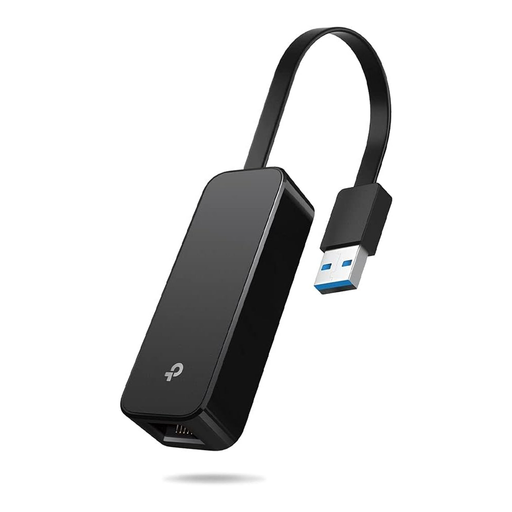
Why This Fits Their Persona: For online gamers using XR glasses with a console like the Nintendo Switch, a stable, low-latency internet connection is crucial. Wi-Fi can be prone to interference and lead to game-deciding disadvantages.
This adapter bypasses the unreliability of Wi-Fi, an often-overlooked weak point in a gaming setup. It establishes a wired Gigabit connection, minimizing latency and connection drops.
Provides a stable 1000 Mbps network connection and is plug-and-play compatible with Nintendo Switch, Windows, and Linux OS. Its foldable design also makes it highly portable.
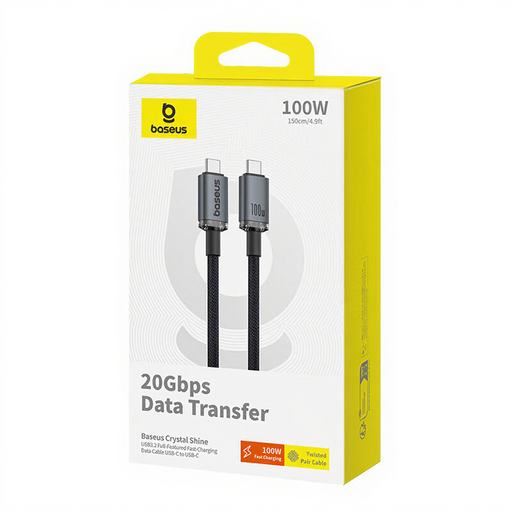
Why This Fits Their Persona: Anyone using XR glasses for long work sessions or extended gaming needs a reliable power and data connection. A subpar cable can throttle performance or lead to connection drops.
This cable addresses the pitfall of limited performance from an inadequate connection. It ensures that both power delivery (up to 100W) and data transfer (up to 20 Gbps) meet the high demands of the XR glasses.
Supports Power Delivery up to 100 watts for fast charging and a data transfer rate of 20 Gbps. The durable nylon braiding ensures longevity for mobile use.
To ensure your XR glasses are compatible with all your devices, having the right accessories is crucial. We've compiled a list of adapters that meet strict selection criteria.
How do you set up XR glasses as a virtual monitor for a PC or Mac? Most modern XR glasses designed to be monitors connect to a PC or Mac via a USB-C cable that supports DisplayPort. You often need special software from the manufacturer (e.g., SpaceWalker for VITURE) to manage multiple virtual screens and adjust their size and position. Ensure that your computer's USB-C port supports video output.
Do I still need my regular glasses with an XR headset that has myopia adjustment? No, typically you don't. Integrated diopter adjustment allows you to set the lenses directly to your prescription, so you don't need to wear additional glasses or contact lenses. However, check the device's adjustment range (e.g., 0 to -4.0D) to ensure it covers your prescription. For values outside this range or for astigmatism, you might still need special prescription lens inserts.
What is the difference between 3DoF and 6DoF tracking in AR/XR glasses? 3DoF (Three Degrees of Freedom) only tracks head rotation. The image moves with your head, similar to a screen fixed in space. This is ideal for watching movies. 6DoF (Six Degrees of Freedom) also tracks your movement through space. You can move around or get closer to virtual objects, which is essential for interactive games and professional spatial computing applications.